My content is reader-supported by awesome people like you. Which means I could earn a commission. Learn more here!
Let’s get to the point:
You’re most likely here because you were searching for terms like…..
- Best eCommerce Platforms
- eCommerce Website Builder Reviews
And:
Looking to test drive the top dogs before making your decision on which ones to try
Darn right, I am: <—- Some confidence on my part 🙂
I mean your overall goal is to build your very own eCommerce website at the end of the day
How was the testing done to rank these?
- Research And Testing Of Each Platform
- Reviews
- Comparing Features
- Readers Feedback
- Other Valuable Researcher Thoughts
Let’s get started and check these out!
How I Like To Test These eCommerce Platforms
| Ease of use | Is it easy to sign up for and is guidance there to not fail |
| Customer Support | I gotta see this somehow |
| Tools it offers (Marketing, SEO, Product Tools) | We need tools without venturing out to other companies all the time |
| 25-point feature checklist | It can be my secret sauce. It includes other areas but it lets me know how it’s doing. |
| Actual customer user ratings | I set out and find actual other users that use this product for their business. These can be on review sites, forums, or my reader’s opinions to give you an idea. |
| Testing project | I try to run it through a project I feel good about |
| Overall rating | After compiling data I give it a rating. |
1. Shopify

Shopify is a one-stop solution for business owners who want to be able to run an eCommerce store on their websites.
Much like other site builders that allow you to build your site exactly the way you want it, Shopify gives you access to its online store builder.
You can use the provided templates to save yourself some time, or you can put everything together from scratch.
Over 1,000,000 online stores run on Shopify because of its dependability and countless features, some of which include SEO and marketing resources, secure shopping carts, and mobile device compatibility.
Just to add, if you still are not sure about Shopify, yet really want to try it.
just head over there and use the 3 day free trial
Want some more great news before you start your free trial?
When you click that button just below and go to Shopify. It will only take you about 10 minutes to get your business name and eCommerce website up and going.
How awesome right? Also, having some issues or just a quick question once you set it up? Just shoot me a quick message ok?
Let’s check out everything is going to offer you.
Shopify Pros To Love
- 100 + Professional eCommerce Website Templates To Make Your Site Look Amazing (Free & Premium Options)
- Easy Template Customization For Every Skill Level
- Flexible Website Design
- Let Your Customers Pay With Their Credit Card To Make It Easy For Them
- Great Shopping Cart (Tons of features to benefit you and your customers)
- Unlimited Web Hosting & Bandwidth So You Never Have To Worry
- Easy Search Engine Optimization (SEO) Features
- Shopify Forum (valuable spot to get feedback and throw ideas around)
- Shopify Apps (Apps make your life simple)
- All In One eCommerce Website Builder And Hosting
- Page building is simple and easy with a ton of features
- Product management is a breeze. Add inventory and sales prices without the hassle
- The best customer service I’ve seen
- Great for custom products.
- POS system if you open a storefront
Shopify Cons To Know
- You need third-party apps to support multiple currencies
- Limited free templates
- Shopify apps can get pricey
So, What Are The Pricing Plans For Shopify? (And Cost Breakdown)
- Shopify Starter Plan – $5 monthly
- Basic Shopify Plan – $39 Monthly – Everything Lite Offers Plus Your Own Online Store. (82.1% Of The People I Help Start Here). Also, great for a company with revenue of around $0 – $15,000 based on the transaction fees and features you will get.
- Shopify – $105 Monthly – When You’re Starting To Grow – 1 Client Has Been Happy With This Since It Started In 2012. Great for a company with revenue of around $15,000 – $109,999 based on the transaction fees and features you will get. But, also you get the ability to do gift cards and professional reporting, and you get up to a 72% discount on shipping.
- Advanced Shopify – $399 Monthly – Advanced Features When Your Scaling. Great for a company with revenue of around $110,000 – $1,000,000 based on the transaction fees and features you will get.
- Shopify Plus (For Larger Companies 1 Million Plus In Revenue )- Negotiated Pricing – This starts at about $2,000 Monthly – Read More About Shopify Plus here
- Shopify Commerce Components – Contact sales
Credit Card Fees For Shopify
- Basic Shopify – Online – 2.9% + 30¢ – In-Person – 2.7% + 0¢
- Shopify – Online – 2.6% + 30¢ – In-Person – 2.5% + 0¢
- Advanced Shopify – Online – 2.4% + 30¢ – In-Person – 2.4% + 0¢
Shopify Transaction Fees For Shopify Payments And External
- Basic Shopify – with Shopify payments – none – external payment gateways are 2%
- Shopify – with Shopify payments – none – external payment gateways are 1%
- Advanced Shopify – with Shopify payments – none – external payment gateways are .05%
- Just To Add – With Shopify Payments, you’re all set up to accept all major credit cards (Visa, Mastercard, American Express, JCB, Discover, and Diners Club debit and credit cards.) And to set it up, just go to the accept credit card section and select Shopify Payments.
Let’s check out some key features that make it #1
- Instant customer support – average wait time for an answer is about 1 minute from my experience. This gives me peace of mind every time knowing I will be taken care of right away with what I need.
- Tons of Shopify themes that are easy to edit – no coding just easy drag and drop and editing of the themes. That way regardless of your skill level you will be just fine.
- Great for any level – they cater to small eCommerce to large. It’s nice knowing this because you don’t know how large your eCommerce store will get.
- Tons of apps – for conversion, member retention, product features, and tons more to really spice up your website. Tons of add-ons to take care of your needs.
- Great community – There are a ton of people that use Shopify so there are a ton of people always talking about it. From forums to specialty developers, you can hire. I love knowing this.
- SEO Features – it’s not as much as a platform like WordPress but it offers a simple way to optimize for SEO.
- Blogging – Their features are quite basic but its simple and overall I feel they do a good job. I had an article ranking on page 1 for a lower volume keyword in about 5 days.
- Easy onboarding – getting started with Shopify is a simple and easy process that walks you right through key things you need to do to be successful.
Would Shopify Work If I Need An Enterprise Solution?
Shopify is def there for you if you need an enterprise solution.
They call it Shopify Plus.
They are currently helping 3500 + enterprise companies get it done which is impressive.
I won’t go into too much detail, because you can click the link just above to learn more.
Some Shopify Testing
- I reached out to them for help to see their customer service time and am pleased to say it only took 13 seconds to start talking to someone via chat. Very impressive time frame. Imagine needing help right away and having to wait. Not going to happen with Shopify. They take customer service to the next level.
- I went ahead and tested a random Shopify website for the speed on Pingdom. This came in with a grade of C at 77 with a load time of 1.44 ms. It’s still faster than 81% of the sites tested through their tool. Keep in mind, every site is different.
- The sign-up process. Well, I guess like most it was super easy. Now, of course, I’ve done it a few times :-). But the process is very simple to get the basics done and get to your eCommerce dashboard.
- SEO page set up – Shopify let me add key descriptions with META info so when search engines index they know what it’s about and what I want to display too. They also let me add key info for my search engine listing preview (what I wanted people to see when they search for a keyword I want to rank for and my page appears.) Bottom line, once you set up a few pages you will see how easy it is to add products and optimize the page. SEO can be tricky but Shopify is making it easy for you to understand it.
- Setting up dropshipping – I went ahead and set up a new eCommerce site from scratch. From here, it took me about 10 minutes to have products in my import list to move to my new store. Also, I was easily able to edit images, descriptions, and tags needed for each product. I also used the Oberlo app right within Shopify which is why it was so simple. If this is your goal, you will really like this.
Let’s walk through a quick Onboarding process (A big fan of this)
We’re going to go ahead and do the initial process of getting started and look at the value here.
If you go here you can get started if you want to follow along.
Bottom line you’re going to be on Shopify’s main page.

Just enter an email address and it will walk you right through the setup process.
Once you have done that you are going to get to the onboarding question.
Here is one of the next ones you should see
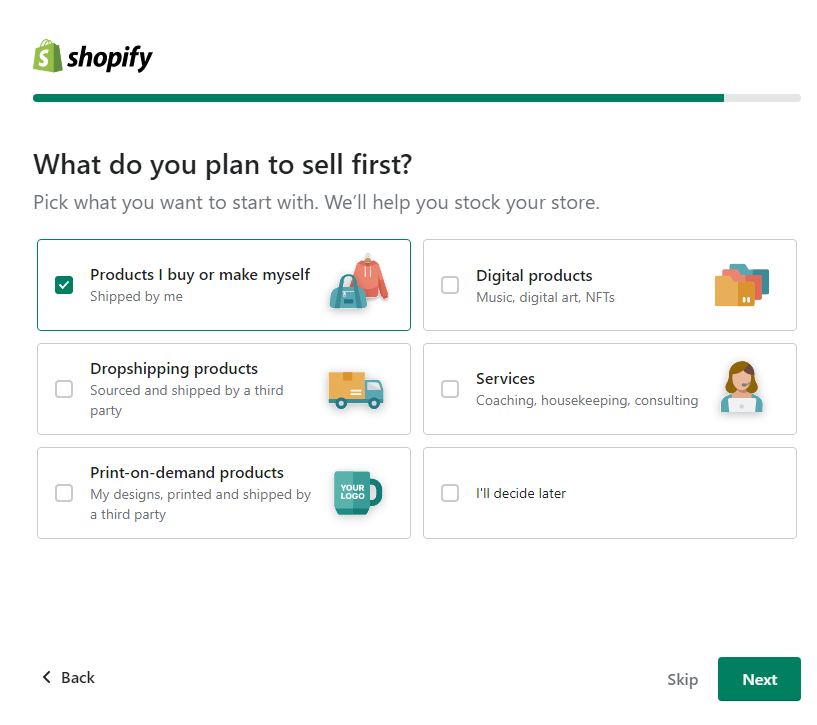
I went ahead and clicked the products I buy or make myself.
Next up there will be a few more questions to understand better exactly your needs.
Once you have done all of that you will come up to your main dashboard with a setup guide similar to this.
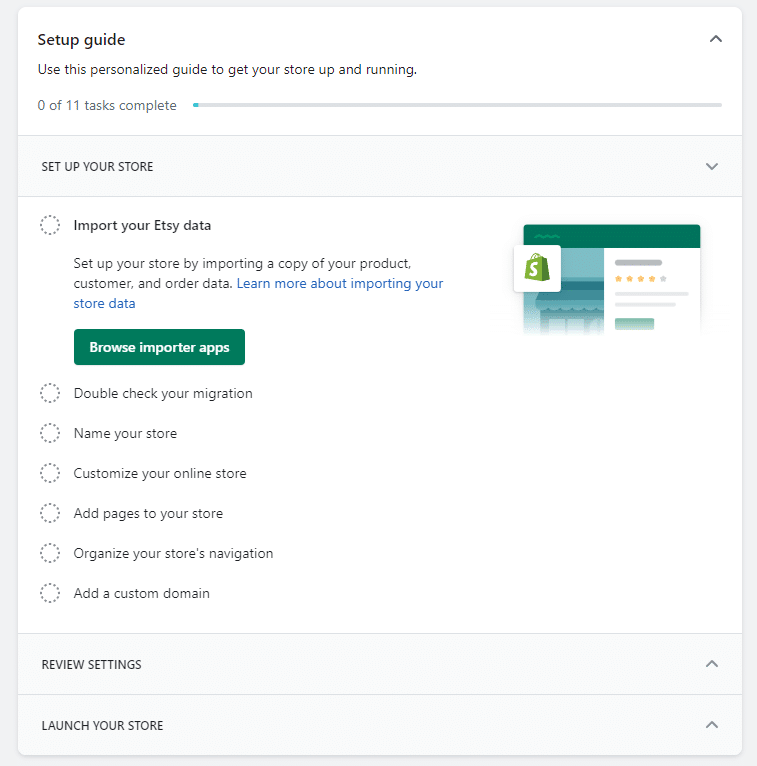
Obviously, all our needs will be a little different but regardless we have a similar dashboard.
This is one nice thing I really like about Shopify because it will walk you through all the key things to get your eCommerce store started and I feel you will agree once you get started.
Shopify Conclusion
Shopify is easily the best overall eCommerce builder they will have the tools to grow with you.
I encourage you no matter what to try Shopify’s 3-day free trial because there isn’t anything to lose.
It’s such a leader, you’re missing out if you don’t at least test it.
Any company that solely focuses on a certain niche usually has the advantage.
2. Wix
With over 77 million users in 190 countries and growing at a great rate.
Wix is a great eCommerce solution to check out.
I was able to open a site in general in just a few minutes which really impressed me because I didn’t have a clue about Wix.
Another really nice thing I like about is Wix is near the beginning when you are signing up and have to choose what type of template you need.
They pretty much spoon-feed you the categories.
For Example:
Let’s say you’re looking to build an online clothing shop.
They have ready-to-go options for your new eCommerce website.
Wix does an awesome job breaking it right down and helping you choose the templates for that industry within the first steps of signing up.
It’s nice to have that peace of mind that you’re already on the right track.
These are only a few of their great benefits for you:
- Set up a website fast (no joke, probably 5 minutes)
- Simple drag and drop to make your life easy when designing your site.
- Dedicated 24/7 to help you when needed
- Optimized for your mobile users
- Tons of templates to choose from that fit your needs and will catch your customer’s attention
- Easily add blog features to your eCommerce website
Wix Pricing Plans
- Light – $16 monthly
- Core – $27 monthly – eCommerce features start here
- Business – $32 monthly
- Business Elite – $159 monthly
- Enterprise – contact for pricing
My Main Wix Con
I just am not a fan of their customer service options. I just feel it takes too long for a response.
It’s not a make or breaker but I sure would like to see them implement a chat service.
Some Wix Testing I’ve Done
- I reached out to Wix for some help with a question I had. It took over 1 day for the first response. Was not a fan of that at all. Their customer service has to step their game up.
- So I went ahead and tested the page speed of a website running on Wix with Pingdom Page Speed tool. In general, websites can be totally different, but I wanted to see how one ranked. The website I tested which I’ll leave out came in with these states. The performance came in at 89 with a B ranking which is good, and a load time of 403 ms. Also stating, faster than 98% of tested sites. Good results.
- I went ahead and signed up to see how easy it was to add a website template. This was a super easy process, Wix puts everything right out in front of you while you’re signing up. So during the sign-up process, I was able to add my template right then and there.
3. Bigcommerce
This eCommerce website builder is perfect for any serious business owner, or if you’re just a beginner.
They offer tons of features that make it super user-friendly.
Such as built-in marketing features to help promote your site, SEO tools to help get your site noticed on search engines, and a secure shopping cart for your customers and payment gateway.
You really can’t go wrong with it because they also offer you a free trial. So the worst thing is you try it out and decide it’s not for you.
Something worth reading:
Check out my full review of Bigcommerce.
Can These Benefits Help You?
- Great SEO Tools (Helps you get found on search engines easier)
- Great Conversion Tools (AKA – Makes People Buy Your Product)
- Marketing Tools To Make You A Marketing Genius
- Tons Of Product Configurations
- Analytic Tools To Help You Analyze Data
- Top-Notch Security
- Payment Gateway
Bigcommerce Pricing Plans
- Standard Pricing – $29.95 Monthly
- Plus Pricing – $79.95 Monthly
- Pro Pricing – $299.95 Monthly
Transaction Fees & Credit Card Processing
- Standard – No transaction fees – Paypal-powered credit card processing is 2.9% + $0.30¢ per transaction
- Bigcommerce Plus – No transaction fees – 2.5% + $0.30¢ per transaction
- Pro – No transaction fees – 2.2% + $0.30¢ per transaction
- Enterprise – No transaction fees – 2.2% + $0.30¢ or lower per transaction
Bigcommerce Testing
- Getting started was simple. I’m basing this off the first time I signed up too. Took under 1 minute to get to my dashboard.
- Picking a theme for my website was easy too. Took me a few minutes to sign the design page, but that’s just because I had to get familiar with the navigation.
- I went ahead and looked for a way to get in touch with someone on my dashboard. And well, I wasn’t that happy that I had to email support for help. I notice they offer it with sales, but not once you’re signed up. I like to see instant help regardless. In general, though, their service is good, I do have to say that.
4. Volusion

Of the sites on this list, Volusion is the one that equips e-business owners with the tools best suited to visually attractive product presentations.
While the designs are not overly Flash-heavy, every aspect of your store will look and feel very smooth and clean.
While Volusion can be tweaked to help you sell any kind of product, the way it is designed is geared more towards selling physical goods.
Customers will be able to easily navigate your store and browse through your products with ease.
Make sure to check out the article Creating An eCommerce Store With Volusion for more information.
Benefits:
- Simple SEO Features To Help You Rank Better
- One Page Check Out Feature To Make It Easy For Your Customers
- Auto-Generated Site Map
- Email Marketing Tools
- Simple Payment Processing To Make It Easy For Your Customers
- Daily Website Backups To Give You Peace Of Mind
Volusion Pricing:
- Personal – $29 Monthly
- Professional – $79 monthly
- Start-Up – $179 Monthly
- Business – $299 Monthly
Testing With Volusion
- I reached out to them to ask a question, and first I got the spot to enter an email address. Which, I don’t want to. Thankfully though after just a couple minutes I got a live chat person. I was happy with that time frame overall.
- I went ahead and signed up for a free trial. And well, I feel they make it very user-friendly to sign up and as well add a template. more is right on the home screen to get started from a visual standpoint.
5. Shift 4 Shop

Shift4Shop, a solution offered by Shift4, emerges as a comprehensive eCommerce platform that equips you with all the tools necessary to build, manage, and grow a successful online business.
Billed as a “Rocket Fuel for Your Online Business”, it bundles a feature-rich turnkey eCommerce solution that promises a seamless shopping experience for your customers, elevating your online venture to new heights.
Creating Your Online Space
With Shift4Shop, diving into the eCommerce world is simplified.
The platform boasts an easy-to-use website builder, enabling you to craft an online store within minutes.
Whether you prefer to quickly select from over 100 free design themes or delve into customizing your site with full HTML/CSS editing capability, Shift4Shop is designed to be responsive and mobile-friendly, ensuring your store looks great on all devices.
Streamlining the Selling Process
Selling your products is made efficient with Shift4Shop’s robust shopping cart and an integrated payment processing system, secured by Shift4.
It provides a customizable checkout experience, complete with features like saved carts and customer accounts, smoothing the path from browsing to buying for your shoppers.
Marketing Mastery
To capture and retain customers, Shift4Shop offers advanced marketing tools.
You can harness the power of email marketing, optimize your store for search engines with built-in SEO tools, and engage your audience through a built-in blog platform.
These features are designed to attract new customers, increase site traffic, and ultimately boost sales.
Management and Analytics
On the backend, Shift4Shop doesn’t skimp on management capabilities.
You can handle every aspect of your business from order and inventory management to customer relationship management and comprehensive reporting.
With these powerful tools, tracking sales and adjusting strategies becomes straightforward, allowing for informed decision-making.
Unmatched Support and Security
Shift4Shop assures peace of mind with ironclad security to protect your customers’ data, including EMV, PCI-validated point-to-point encryption (P2PE), and advanced tokenization.
Unmatched customer service is a keystroke away, with a dedicated eCommerce support team available 24/7 to assist you.
Plus, you’ll have access to on-demand resources—articles, videos, and more—to guide you through any eCommerce challenge.
In summary, Shift4Shop from Shift4 positions itself as not just a platform for creating an eCommerce website but as a comprehensive solution for entrepreneurs eager to venture into or expand their online presence.
With robust tools for creating, selling, marketing, and managing an online business, coupled with competitive pricing and strong security, Shift4Shop promises to be a one-stop solution for aspiring and seasoned entrepreneurs alike.
6. Weebly – Which Is Part Of Square
Weebly is a very powerful yet easy option for an eCommerce website that you’re about to build.
Many times, you will hear it compared to Wix when your doing your research too on website builders.
It offers some very nice features such as powerful ways for your customer to search and filter for products they are looking for.
This is a very important feature because your customers need to get to what they want easily.
Just to add a little pricing bomb on you. The Weebly eCommerce pricing starts at only $8 when you get into the paid plans which I highly suggest.
Here Are Some Killer Features I loved:
- Easily Set Tax Rates For Your Customer’s Locations
- Integrated Blog (Great For Content Marketing)
- SEO Options To Get Your Site And Products Found
- Powerful Features To Search For Products
Weebly Pricing Plans:
- Free Plan – Totally free
- Personal Plan – $13 month to month and average $10 monthly if paid annually.
- Professional Plan– $16 month to month or $12 monthly if paid annually.
- Performance – $29 month to month or $26 monthly if paid annually.
Weebly eCommerce Transaction Fees
Stripe, Authorize.net, and PayPal are the providers for Weebly. All of these services charge a 2.9% + $0.30 transaction fee.
Weebly charges an additional 3% with their starter and pro plans. But you can use the business plan to avoid this additional fee.
A Con For Me:
- Weebly needs more templates. Tons of potential but I need some more options.
Ready to start building with Weebly
or read the Weebly review here
7. Squarespace eCommerce Website Builder

Squarespace is on my radar right now why I continue testing it.
It’s worth mentioning it though and getting the info on it NOW
Let’s dive into some key info on Squarespace:
- Developed by Anthony Casalena for personal use as a blog hosting service while attending the University of Maryland
- Initially, it was funded with $30,000 from Casalena’s father,
- As of 2016, it hosts more than one million websites. (Sounds like millions now but no exact number)
- 818 Employees
- Squarespace was making $1 million in revenue annually in 2007
Squarespace Pricing
- Personal pricing plans – $23 monthly or $16 monthly if paid annual
- Business pricing plans – $33 monthly or $23 monthly if paid annual
- eCommerce basic – $36 monthly or $27 monthly if paid annual
- eCommerce advanced – $65 monthly or $49 monthly if paid annual
Key Features Between These Two Plans (What Does Advanced Have That Basic Doesn’t?)
- Abandoned Cart Autorecovery – Let’s you send automated emails to anybody that left their shopping cart before completing the purchase. Why care about this? Helps you try to recover the sale.
- Real-Time Carrier Shipping – Squarespace calculates real-time shipping which could save you money. As well, it helps with accurate package size calculations.
- Full Control Over Store Promotions. Such as exclusive discounts and more.
- Sell Digital Gift Cards – Great little touch
- Utilize Order API – To keep it simple, this lets you build custom integrations with 3rd party systems for order fulfillment and production logistics.
Popular Questions Asked About Squarespace
- Is it easy to cancel? Squarespace makes it super easy by being able to do it right from your dashboard. I like this so you don’t have to call and get pressured.
- Is it easy to change plans? This can easily be done in your dashboard too.
Templates Offered By Squarespace
Squarespace has different sections broken down. So, for instance, online stores (which this is our focus), blogger, wedding templates, and so on.
For templates title online store, they have a total of 12 while writing this.
Not too bad, personally I’d like to see a marketplace to buy more or more premium options.
But, there isn’t one.
There is a developer section though where you could hire someone to help you edit it.
I will say they are all clean and good-looking, but some might want more.
8. Zyro – eCommerce Website Builder Option
Zyro is a nice option in the eCommerce world to run a smaller eCommerce business.
A good breakdown of this option is a nice mimic of its competitor Wix.
It’s got a ways to go of course but you can see tools and features that mirror it.
As well it has a nice free trial with no credit card needed which is nice since you don’t have to commit.
Let’s break down some stuff:
Pros:
- A great number of payment provider options to choose
- Ability to integrate with your POS system for in-person selling
- Free Trial
- As low as $3.99 a month after a free trial
- 100 + website templates
- Very beginner friendly
Cons:
- Limited SEO tools
- Can’t switch templates once the site is live
Pricing:
- Website Plan – $11.99 monthly or $2.59 monthly if paid annual
- Business plan – $14.99 monthly or $3.59 monthly if paid annual
One thing to add on Zyro too is they are being rebranded as part of Hostinger so I’m following this a bit to see what this looks like.
Let’s Address The Elephant In The Room
So:
What’s the best free eCommerce builder?
UGH, I hate to say it
But, you’re not gonna find one to fully fit all your needs.
You might find something very basic.
But, when it comes to building an eCommerce website you’re going to have to pay something.
This is to your benefit too.
All the features you get in a pricing package is so worth it.
Take the $29 Basic Shopify Plan
The fact you get immediate help on questions you have is worth the value all by itself.
Don’t worry though, you get a ton more.
So, in my opinion, I would stop hunting for a free eCommerce builder and really test one of these.
So, What Would I Do?
Let’s look at a few different ratings:
- Best overall eCommerce builder – Shopify is the best overall platform out there and the one I would use hands down.
- For a small eCommerce website business – In this case, I would personally use Wix, Weebly, or Shopify. I would easily lean towards Shopify though because what are the odds you won’t scale your eCommerce business?
A quick note too:
I’ve seen a few different articles covering the best small business eCommerce website builders.
Personally:
For me, they all fit in the same area and only rank as the best overall eCommerce website builders
I like to look at the overall big picture and don’t want to break them down based on your size.
Because:
You need something that is gonna be there for you while you’re small
And:
As you grow larger.
A Few Online Store Builders I Don’t Mention Or Have Not Tested
Some other reviews on the top eCommerce builders will possibly cover some not on my list.
Which:
Is cool we all have our own opinions.
Here are a few not on my list but maybe you want to check out.
WooCommerce – Super popular in the eCommerce world but it doesn’t meet my website builder standard. As in, it’s not as easy to set up and get started.
Magento – Very popular in the eCommerce world but a ton more going on. Not just a website builder.
3D Cart – On the radar and could see it possibly soon
Best eCommerce Website Builders Frequently Asked Questions
What's the best ecommerce website builder for beginners?
If you're new to the eCommerce game, Shopify or Wix walks the line between simplicity and power perfectly. Its intuitive drag-and-drop interface is a breath of fresh air for anyone who doesn't want to touch code, while still offering robust features to get your online store up and running smoothly.
Are there any decent free ecommerce website builders out there?
Square Online gets my nod here. It allows you to launch an online store without dipping into your funds. While it's basic compared to paid options, it's definitely a solid starting point. As your business grows, you might want to upgrade, but it's a great way to test the waters.
Which eCommerce platform is the best for SEO?
Shopify takes the cake for SEO. It dishes out all the SEO goodies you'd need – straightforward tools for customizing your titles, meta descriptions, and URLs, plus it gets behind-the-scenes stuff like sitemaps and SSL certificates right too. Handy if you're looking to play nice with Google.
Can I sell on social media with eCommerce builders?
Both Shopify and BigCommerce shine in this department, offering slick integrations with social channels like Facebook and Instagram. It’s a straightforward way to extend your store's presence and tap into social commerce without much fuss.
What about dropshipping capabilities?
Shopify and BigCommerce, again, are top picks for dropshipping. They offer seamless integrations with major dropshipping apps like Oberlo, allowing you to populate your store with products directly, without having to deal with inventory physically. Super useful for getting started quickly.
Is switching eCommerce platforms a headache?
Transitioning between platforms isn’t the simplest of tasks, but it's far from impossible. Most leading platforms offer migration tools or guides to help make the move as smooth as possible. My advice? Go for a platform that can scale with your business to minimize the need for such changes.
How important are mobile features in ecommerce builders?
In this day and age, hugely. Platforms like Shopify and Wix ensure your online store is not just mobile-friendly but shines on mobile devices. Considering how much shopping is done on phones, this is non-negotiable for reaching your audience where they are.
Can I manage my eCommerce store on my phone?
Yes, and it’s pretty cool. Leading platforms provide mobile apps that empower you to manage orders, inventory, and customer queries from anywhere. It means your business moves with you, making life a bit easier.
What payment options can I offer with these eCommerce platforms?
The more, the merrier. Shopify, Wix, and BigCommerce let you accept a wide range of payment options – think credit cards, PayPal, and digital wallets like Apple Pay. Catering to customer preferences can definitely nudge those conversion rates northward.
What's the deal with customer support from these platforms?
Top-notch, generally. Whether it's comprehensive help centers, live chat, or email support, help is at hand. Some, like Shopify and BigCommerce, also offer 24/7 phone support, which is gold when you need answers fast.
Conclusion On The 7 Best eCommerce Website Builders
Choosing the best eCommerce online solution doesn’t have to be difficult.
I’ve shown you the top 5 online store builders.
It’s now just time for you to choose and test.
Remember, it doesn’t cost anything to try them so have fun.
Each one has great benefits that can help you get online.
Just to recap in case you forgot:
The 8 Best eCommerce Website Builders Are
-
Shopify
-
Wix
-
Bigcommerce
-
Volusion
- Shift 4 Shop
-
Weebly
-
Squarespace
-
Zyro
Have fun testing them and get your hands dirty.
Let me ask you something too:
Have you had the chance to try any of these yet?
Or do you have a question in regards to using them?
Drop me a line below if you need help, or have a question.
If you want 1 on 1 help though head over to my contact page and we can talk via email
