My content is reader-supported by awesome people like you. Which means I could earn a commission. Learn more here!
I figured it would be nice to put all the Shopify plans in one spot
Afterall:
It’s nice to see what they offer, and what you get especially if you’re already browsing around on this website.
And on top of that, a ton of readers are searching for terms such as…..
- Shopify Annual Plan
- Starter Plan
- Shopify Plus Pricing
- Shopify Pricing Plans
- Shopify Fees
So in seeing this, I thought how fun to kind of open the Shopify pricing books and show you what you’re going to pay.
I will also break down the fees and other perks you get with each one.
Keep in mind too
If you’re not sure which one you should start with, read closely on my recommendations depending on your needs.
A quick note: pricing plans can be tweaked often and I do my best to catch them.
If you see something though, just let me know, please 🙂
Shopify Pricing Plan Summary
| Free Trial | Now back to a 3-day free followed by 1 month for a $1 |
| Discounts | Starts at 25% off |
| Shopify Pricing Plans | Starter $5, Basic $39, Shopify $105, Advanced $399, Plus $2K+ |
| Additional Fees You | Transaction, Fulfillment, Email Hosting, Domain, ETC |
Shopify Plans Comparison
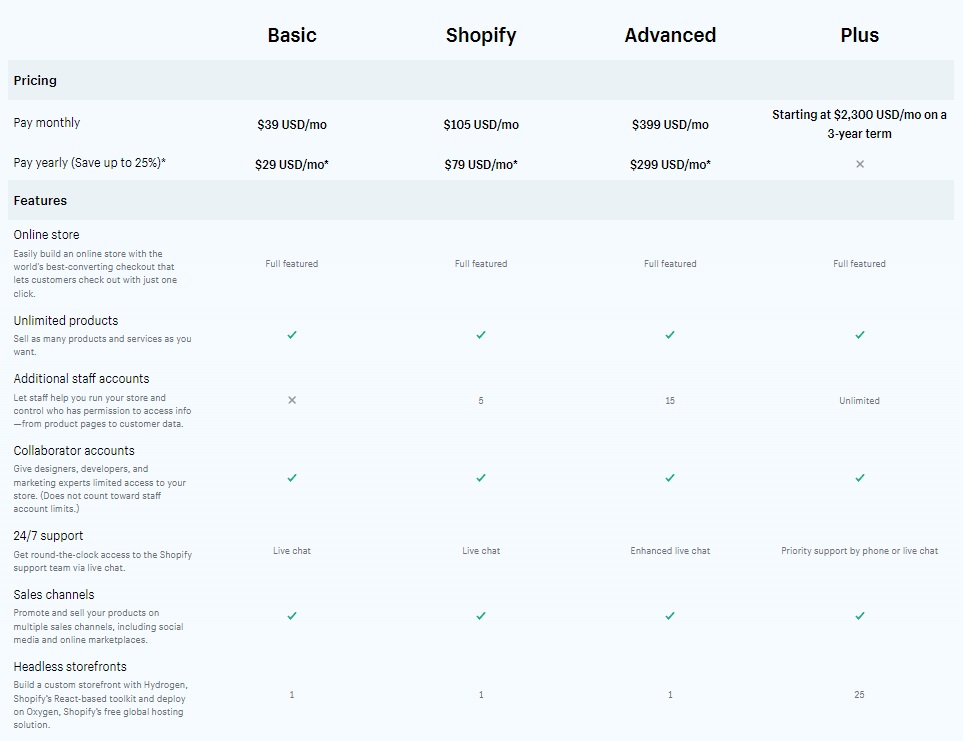
See Full Pricing Comparison Here
Shopify Pricing Plans
There is no setup fee for any Shopify plan.
Each comes with a risk-free trial!
No credit card information is required upfront.
Once the trial is up, however, a form of payment must be supplied to Shopify.
Canceling a plan can be done at any time.
All contracts are month to month which means that if the plan no longer serves your needs, you can move on to another one or a different company offering e-commerce solutions.
- Shopify Starter Plan – $5 Monthly – This replaced Shopify Lite
- Basic Shopify – $39 Monthly – 82% Start here
- Shopify – $105 Monthly – 11% Start Here
- Advanced Shopify – $399
- Shopify Plus – Starts around $2000 monthly
What about annual discount Shopify pricing?
Ok Ok 🙂
Once you’re logged in you can see different discounts offered.
Basic Plan Discount
If you pay annually you can get it for $29 monthly coming out to $348 per year.
Which saves you $120 a year.
Shopify Plan Discount
If you pay annually you can get it for $79 monthly which brings that down to $948 a year.
This saves you $312 a year.
Advanced Shopify Plan
if you pay annually you will get it for $299 monthly which comes out to $3,588 per year.
This saves you $1,200 a year.
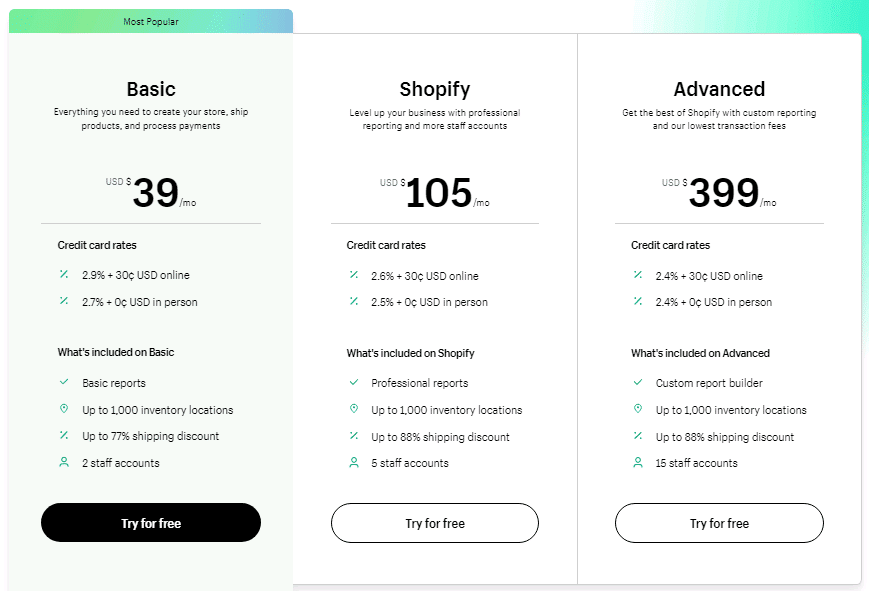
Shopify Transaction Fees and Credit Card Rates
We covered these to an extent under each pricing plan but let’s check this out right here in its own section to compare all of them.
Here is a very simple breakdown:
Credit Card Fees For Shopify
- Basic Shopify – Online – 2.9% + 30¢ – In-Person – 2.7% + 0¢
- Shopify – Online – 2.6% + 30¢ – In-Person – 2.5% + 0¢
- Advanced Shopify – Online – 2.4% + 30¢ – In-Person – 2.4% + 0¢
Shopify Transaction Fees For Shopify Payments And External
- Basic Shopify – with Shopify payments – none – external payment gateways are 2%
- Shopify – with Shopify payments – none – external payment gateways are 1%
- Advanced Shopify – with Shopify payments – none – external payment gateways are .05%
- Just To Add – With Shopify Payments, you’re all set up to accept all major credit cards (Visa, Mastercard, American Express, JCB, Discover, and Diners Club debit and credit cards.) And to set it up, just go to the accept credit card section and select Shopify Payments.
Hopefully, this breaks it down a little bit to understand it better.
Shopify Starter Plan – The New Starter Plan Replacing Shopify Lite
The Shopify Starter Plan will be taking over for the Shopify Lite Plan
This will offer many of the same features Shopify Lite will but just at a better price point.
As well, I like the fact you will have a basic storefront for $5 bucks
Key Things to Know:
- $5 Monthly
- For selling on social media
- Transaction fees are 5% when using Shopify Payments
- Link pop included
- Fast upgrade to another plan if needed
Who is the Shopify Starter plan best for?
The Shopify Starter plan is perfect for anyone that needs eCommerce functionality if you already have a blog, social media accounts, or WordPress website.
Basic Shopify Plan – 82% Of My Readers Start Here
Shopify’s Basic Plan is great for new business owners.
It costs $39 a month which is very reasonable for start-ups.
It offers a variety of features and gives users access to two staff accounts.
If you have someone else who will help manage your business, they can have a separate account to work with.
Basic Shopify account users needing more accounts to work with will want to look into a Shopify monthly plan which offers additional accounts for more than two people.
It’s a slight jump in price but well worth it to keep operations running smoothly and staff properly equipped to handle the job tasked to them.
Credit Card Rates
The credit card rates for Basic Shopify are broken down by transaction type.
Online credit card transactions cost users 2.9% + 30 cents.
In-person, transactions are considerably less. They cost you 2.7% of the final cost.
Transaction Fees
There are no transaction fees if you’re using Shopify payments.
Using external payment gateways costs 2.0%.
Shopify members are able to sell unlimited items on even the Basic plan, making it a wise investment for even the smallest business.
Ability to Switch to Different Membership Plans as Your Business Grows
As the operation and demand for the product grow, Shopify customers are able to switch plans to better accommodate their needs.
That’s one of the biggest selling features of the accounts.
The monthly price of membership is very affordable and competitive when it comes to other e-commerce website companies.
This is an option that appeals to many businesses that don’t want to have to move their entire operations to a different provider.
Being flexible in its offerings makes Shopify one of the most popular e-commerce options available.
People can decide which membership level best accommodates them and their business needs.
Features of a Basic Account
Some features that are included with a Basic Account include unlimited file storage, a +$49 retail package, and a good Shopify shipping discount.
There is also the ability to print shipping labels, analyze instances of fraud, create manual orders, and offer discount codes, too.
Customer support is 24/7 and a website with a blog and free SSL certificate is included.
Members who choose Shopify or Advanced Shopify plan to gain access to even more features.
The additional monies they pay monthly entitle them to numerous features as well as the ones offered to Basic Account members.
If there is a feature that you want specifically, keep in mind which membership levels offer it.
A free trial is a good way to test Shopify out to see if it’s a good fit for you and your business.
You’re entitled to one before committing to being a paying customer.
Once you’ve signed up for an account, you’re able to test out the services for yourself.
Who Should Use This Plan?
The basic Shopify plan is going to be perfect for anybody to get started.
Great for starting a new business or a small one quite new.
You’re going to get 2 staff account perfect for a small team to get started.
So:
Bottom Line:
If you’re just starting an eCommerce business this is a perfect spot to start.
Because regardless you can just upgrade to the next plan.
Shopify Plan – 10% Of My Readers Start Here
Shopify’s second membership plan is simply named Shopify.
It costs $105 a month and is best suited for medium-sized businesses that are growing quickly.
The features offered by this membership plan build off the ones offered by a Basic Shopify membership plan.
Credit Card Rates
Credit card rates for this level of membership are charged based on whether they were made online or in person.
Online rates cost 2.6% + 30 cents per transaction.
In person, they are far more affordable at 2.5% which means that you have the option to sell items in a brick-and-mortar storefront or outdoor market as well as online.
Transaction Fees
Transaction fees work in a similar fashion.
If they’re made using Shopify payments, there is no cost.
If external payment gateways are used, there is a 1.0% transaction fee.
With each new membership level, transaction fees decrease.
An increase in monthly pricing plans covers the difference.
You basically get what you pay for by saving on credit card rates and transaction fees.
Features of a Shopify Account
A Shopify account comes with five staff accounts which are great for up-and-coming businesses.
It allows you to list unlimited products and file storage.
Like with a Basic account, you get access to a +$49 retail package.
In addition to all the features offered with a Basic package, Shopify members get the following features:
- Ability to issue and accept gift cards.
- Access to professional reports.
- Abandoned cart recovery.
These features help you get to know your customer and their needs better.
It assists you in coming up with a solid marketing plan based on your demographic.
It makes your business scalable and successful.
Who Should Use The Shopify Plan?
This eCommerce plan is perfect for when you’re starting to grow and scale.
You get 5 staff accounts to manage it, and an abandoned cart recovery option for anybody that left their cart filled with products.
So, you will directly email them a link to finish with a customized message.
This is super important in increasing your conversion.
On top of that:
With your growth, you will want to cut down on rates and you will be nice at the middle of the road to cut costs down.
Advanced Shopify Plan
Advanced Shopify membership plans cost $399 a month and offer features that help scale your business.
Members receive unlimited products and file storage as well as 15 accounts.
That’s an ample amount of accounts for the employees that help you run your business.
Credit Card Rates
Credit card rates for this level of membership include online which is charged at 2.4% + 30 centers and in-person which is charged at 2.4%.
It’s the lowest credit card rate of the three tiers of membership.
This is, of course, because of the monthly fee being charged by Shopify.
You’re able to take advantage of the savings because you pay more upfront for an account.
Your monthly membership fee entitles you to these savings.
Because you’re able to list and sell unlimited items, this can be a distinct discount for you and your business.
Transaction Fees
Transaction fees do not exist if Shopify Payments are used.
Using external payment gateways costs 0.5%.
Again, this is lower than the other two plans because of the cost of a monthly membership.
Features of an Advanced Shopify Account
Advanced Shopify offers the same features as the other two membership plans.
It does give you access to an advanced report builder and allows you to calculate shipping rates for third parties.
This gives you better control of how you ship your products to your customers.
Who Should Use The Advanced Shopify Plan?
If you run a large-sized business, you’ll find the Advanced option ideal.
It costs more monthly to have but you save a lot of money on credit card rates and transaction fees.
You’re also given additional features that you don’t have to purchase elsewhere.
Gaining access to all the tools that you need in one secure spot is ideal.
The fact that you’re able to assign separate accounts for up to 15 people makes a big difference, too.
People are able to do their jobs without interference, adding to the overall efficiency and success of your business.
Shopify Plus Pricing
Shopify Plus is for high scale eCommerce stores.
Let’s look at some key items:
- For high volume
- For fast-growing eCommerce stores
- Price varies on your needs
- Dedicated support team
- Starts at $2,000 monthly
- 0.15% transaction fee when using a third-party payment process
Who is the Shopify Plus plan for?
If you’re a large eCommerce store this is most likely where you want to be.
They cater to some large organizations such as the Los Angeles Laker eCommerce store.
Shopify Commerce Components
This is an area you will need to contact sales for this.
Shopify commerce components will give you the flexibility to build out your store.
Here is some info on it:
- Build custom storefronts with Headless API, Headless SDK, and Headless hosting.
- Detailed card and check out with leveraging Shopify’s API.
You can check out Shopify commerce components fully here
Other Costs With Shopify & Other Things To Know
Running into additional costs is normal when you are running an eCommerce business.
Here are some extra costs to keep in mind.
Domain Costs
Shopify allows you to purchase a domain through them for right around $14 annually but doesn’t include email hosting.
The easiest thing to do is look elsewhere like Name Cheap or Godaddy and just buy your domain there and utilize their email options.
Don’t worry either, it’s a piece of cake to connect a domain to your Shopify store.
Email Costs
You have to purchase your own email options.
Shopify doesn’t provide email hosting.
Thankfully, you can do that right where you purchase your domain.
You can send up to 10,000 emails monthly for free and then after that, it’s $1 per 1,000 additional emails.
App Pricing Costs
Now there are plenty of free Shopify apps but some require you to pay.
So, it’s just good to keep that in mind.
I’d say though, there are plenty of free ones that should fit your needs.
But:
Sometimes it’s worth paying because of the value it brings to the table.
The price range in general is going to be free to $299 monthly.
Shopify Theme Costs
Shopify themes range from free to about $180 based on what is offered on Shopify.
In my opinion:
It’s a fair cost when it comes to getting your eCommerce site up and running.
If you are looking to get even more in-depth you can hire someone or get more customized themes that could cost you way more
Bottom line:
Plan on spending up to $180
VAT Charge Added (Value-added tax)
Shopify is required to charge this to all EU (European Union) goods and services.
Keep in mind this is only charged here and not outside of EU.
This standard rate is 20% but can vary a bit depending on where your customer is.
You can check out rates here
Currency Conversion Fee
Just keep in mind when you sell to customers in other countries you will have the currency conversion fee.
There is a market rate at which the currency is exchanged for.
One key thing to keep in mind is if there is a refund given you aren’t given back this fee.
The key rates are:
- 1.5% in the US
- 2% in all other countries and regions with Shopify Payments
Shopify Fulfillment Costs – Add-On Costs If You Use It
This is obviously a fee you have to want to add to your Shopify plan.
But Shopify offers full fulfillment just like Amazon does.
As in full inventory management, product storage and handling, postage and packaging supplies, and two-day delivery if eligible and available.
Some key things to know:
- Free storage for items sold within 6 months
- No long-term contract
- Flat rate for returns
- 2-day delivery for your customers.
A quick example is if you had a product weighing 1 LB the cost would be $9.13.
This does scale down as you have more.
For example, it could end up being 44% off if you had 3 items in the orders.
You can learn more here
Shopify Pricing Plan Discounts
In general, Shopify offers plan discounts for paying upfront for a year or multiple years.
But:
Sometimes they go above and beyond that too for usually some good reasons.
Be on the lookout for different ones on their pricing page, banners on their website, and also emails if you are signed up.
Shopify Pricing For POS
With all this talk about Shopify’s amazing online options, I thought it would be nice to understand their POS system for their retail location or offline.
The nice thing bout the Shopify POS is it works nicely with your online setup which lets you cover all of your business needs online and offline.
Let’s cover a few quick questions you may have:
- What is POS? – A point-of-sale system helps to make sales in person. It’s the combination of software and a device people use to make a transaction and accept payment.
- What is an example of POS – imagine going to Target and you go to check out to purchase something. This would be a POS system. 🙂
Pricing for Shopify POS
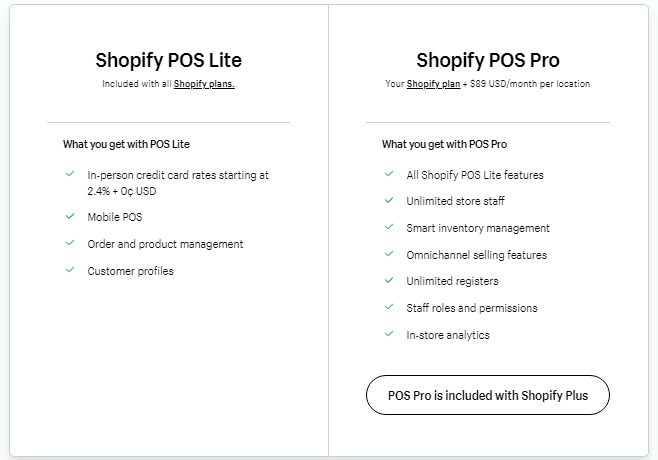
With this comes the Shopify POS Lite and as well the Shopify POS Pro
The Lite plan is actually included with all the Shopify plans already.
Shopify POS Pro is included with Shopify Plus
The Shopify POS Pro is going to cost you an additional $89 monthly per location.
Here is a side-by-side comparison of the Shopify POS plans.
Common FAQ Shopify Pricing Questions
What’s the best free trial period?
I would say it’s the 120-day free trial plan I’ve seen for the 1 Million Black Businesses movement. You can read more about it here and here.
What is the $1 dollar a month for 3 months Shopify?
It’s a nice trial period offer where you get a free trial, and then after that for 3 months you will pay $1 per month.
What’s included with Basic Shopify?
When diving into Basic Shopify, I find it impressively geared towards newcomers in the e-commerce scene. For $29 a month, you can set sail with your online store hosting an unlimited number of products. Additionally, you’re armed with two staff accounts, around-the-clock support, sales channels, and manual order creation. It’s quite a comprehensive starter pack, if you ask me!
Can I upgrade my Shopify plan later on?
Absolutely, you can! Shopify’s flexibility is one of the features I appreciate the most. It allows businesses to adapt their plan as they grow, therefore transitioning smoothly to a more comprehensive plan when you feel the time’s right. It’s like being able to expand your toolbox on demand!
What do we need to know about transaction fees in Shopify?
Here’s the deal with transaction fees—Shopify drops them completely if you use Shopify Payments, which is a nice bonus. If you opt for another payment provider, a transaction fee applies which scales down as you move up in plans—starting from 2% for Basic, down to 0.5% for Advanced Shopify.
Is the pricing for Shopify Plus flexible?
Indeed it is! Shopify Plus pricing starts at around $2000 per month, but it’s not a static rate. Think of it as a tailored plan; you pay for exactly the level of service and features your business requires. No need for a one-size-fits-all approach here.
What features does the Shopify plan offer?
Taking a step above Basic, the Shopify Plan adds a few more tools to your kit at $79 per month. In my observation, it increases your staff accounts to five, aids you with professional reports and reduces the transaction fee if you’re using an external payment gateway. Perfect for businesses that are ready to step up their game!
Does Shopify provide domain registration services?
Shopify does offer domain registration, indeed. This choice ensures that you can secure your store’s domain directly through Shopify, with prices starting from $11 per year after the first year. It keeps everything business-related right where you need it–under one roof.
What does Advanced Shopify bring to the table?
Advanced Shopify, at $299 per month, comes packed with substantial firepower. With 15 staff accounts, advanced report builders, and third-party calculated shipping rates, it’s a substantial upgrade for businesses that are moving their e-commerce operations up a few notches.
Any in-built Point of Sale (POS) in Shopify?
Yes, even the Basic Shopify Plan has nifty POS features. Your in-person sales and inventory management integrate seamlessly with your online store. It’s a well-oiled machine, ensuring your inventory stays updated across the board.
How easy is it to cancel a Shopify plan?
Shopify values your freedom. If you wish to cancel, you can do so at any time. Just remember to export any essential data before pulling the plug.
Is there a free trial period for Shopify?
Yes, Shopify offers a free trial period to test out their services, no credit card details are required. It’s a great, zero-commitment way to explore what Shopify can do for your business.
So, Where Should You Start, If You’re Still Just Not Certain?
So, since every business is quite different everyone has certain needs for their business.
They might need 5 staff accounts that fall under the Shopify plan
Or
Maybe they’re fine with 2 staff accounts which would be great for the Basic Shopify Plan
So, just to break it down I want to share a stat of where the people I help with Shopify start.
Around 82% are starting with the Basic Shopify Plan.
I find this is a great starting point for a lot of eCommerce businesses because it has everything the Shopify Starter Plan has
and, it also gives you the ability to have an online store.
Now, keep in mind if you’re a larger business or scaling fast, sure you might upgrade fast
But that is a click of a button to upgrade
Probably the best thing to do is to start your free trial
- Sign Up
- Fill Out The Business Info To Gain Access To Your Store
- Select A Plan
- Contact Shopify VIA Chat Right Then And Talk To Them For Peace Of Mind
Compare Shopify Pricing To Other Options
| Top Uses For Website Builder | Starting Monthly Pricing | |
| Shopify | eCommerce | $39 Monthly |
| Wix | Basic Site, eCommerce, Photography | $16 Monthly |
| Bigcommerce | eCommerce | $29.95 Monthly |
| Weebly | Basic Site, Photography | $10 Monthly |
| Volusion | eCommerce | $35 Monthly |
| Squarespace | Basic Site, eCommerce & Photography | $23 Monthly |
| Strikingly | Basic Website Builder | $12 Monthly |
| Jimdo | Basic Website Builder | $9 Monthly |
| Zyro (Rebranding To Hostinger) | Basic Website Builder & eCommerce | $11.99 Monthly |
Shopify Pricing Plans Conclusion
Just to recap:
The 5 Shopify pricing plans are:
- Shopify Starter Plan – $5/Monthly – Shopify Starter Plan is $5 monthly and taking place of Shopify Lite
- Basic Shopify – $39/Monthly
- Shopify – $105/Monthly
- Advanced Shopify – $399/Monthly
- Shopify Plus – Starts at $2000 Monthly
As you can see the 3 main options are packed with tools and features to help your business succeed.
It’s just a matter of finding the perfect price point for you to start at.
The best thing of all is you can scale or downgrade if needed.
You’re never trapped with something you don’t want.
If you have any questions or need some help just drop me a line in the comment section below.
