My content is reader-supported by awesome people like you. Which means I could earn a commission. Learn more here!
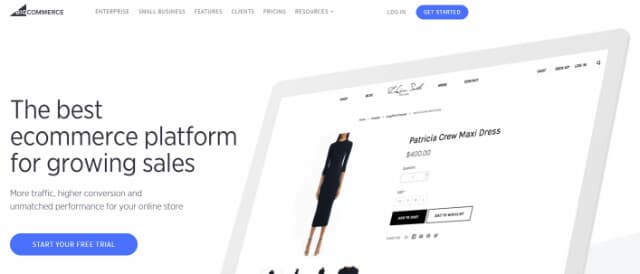
You want a Bigcommerce review that is going to help you decide if it’s right for you, correct?
Well, good:
I mean, after all……
The realm of eCommerce has evolved from a relatively small sector of Internet users to a $1.2 trillion industry.
While traditional storefronts are still a primary point of sale for millions, the injection of digital offerings and the simplicity of online shopping has led to a statistically significant increase of digital buyers.
In fact:
the latest research suggests that by 2018 nearly 47.3 percent of all Internet users will purchase products online.
Due to fierce competitiveness, eCommerce retailers must maintain exceptional user experiences in order to attract and maintain user attention.
While the foundation of online success involves the performance and functionality of your website, the design, and functionality of an online store is the ultimate deciding factor.
The modern eCommerce store industry is filled with various options and programs designed to “increase your sales,” and “protect your brand.”
Although many of these digital storefronts provide solid services, few offer the flexibility, simplicity, and branding capabilities of Bigcommerce.
With over $4 billion in sales from more than 55,000 digital retailers, Bigcommerce is quickly becoming one of the top choices for serious eCommerce businesses.
Although its performance statistics are impressive, how does Bigcommerce differ from other eCommerce store applications?
Moreover, how can Bigcommerce enhance your sales and brand?
Ok, let’s get started on this Bigcommerce Review:
Bigcommerce – Fully Equipped for Success
At first glance, Bigcommerce seems quite similar to other eCommerce store applications.
However, as you delve into its capabilities and offerings, its potential to skyrocket sales and solidify your online reputation becomes clear.
This goal is accomplished by offering a digital enterprise complete control over every aspect of its online store.
Moreover, its features delve far deeper than a secured shopping portal. Unlike other eCommerce solutions, Bigcommerce allows users to control, market, and analyze store performance via the latest in eCommerce technologies.
Create a Visually Captivating eCommerce Store
Internet users are driven by not only performance but also aesthetics. A well-designed store not only attracts but also maintains user attention. It’s no secret Internet users are fickle.
A single design flaw could result in a potential loss of revenue. Bigcommerce understands the true value of a thoughtfully designed storefront.
Therefore, it offers users nearly 15 individual features created to promote visually arresting stores and streamlined navigation. Some of these features include:
Pre-Designed Themes
Bigcommerce offers a myriad of professionally designed store themes for all users.
All themes provide stunning graphics, high-end navigation, and swift rendering speeds for most user platforms.
If you have very little design experience but wish to avoid spending hundreds on a professional graphic designer, these themes may be your saving grace.
Code-Free Design Editor
Instead of implementing a pre-built theme, Bigcommerce offers a Style Editor for customized store elements.
Streamlined Integration
Users who have an existing eCommerce store can easily integrate their design into the Bigcommerce interface.
With a few clicks of a button, an entire enterprise is seamlessly imported and set up to be used with other Bigcommerce features.
Professional Marketing Capabilities
While you may have a visually compelling eCommerce store, if you don’t have visitors then its design is pointless.
Bigcommerce understands success is closely connected to marketing.
Therefore, all users are offered over 30 features specifically created to assist in your marketing efforts.
The most notable features include:
Shopping Cart Saver
Did you know that over 70 percent of eCommerce shopping carts are abandoned before the user finishes the checkout process?
There are a myriad of reasons why this statistic is so high; however, the most successful digital stores are those that assist buyers, even if the shopping cart is abandoned.
With the Abandoned Cart Saver feature, user shopping carts are automatically saved for future use.
Moreover, this feature allows enterprise administrators to send customizable emails to users in an effort to lure them back.
Increase your conversion rates by including a unique coupon code to encourage users to finalize their purchase.
Customizable Coupon Codes
Provide discounts and special deals to select users with fully customizable coupon codes.
Digital coupons allow full customization, such as limiting code usage, establishing an expiration date and offer a specialized product or shipping discount.
Shopping Comparison Sites
Showcase your special pricing or great deals by automatically integrating specific products to various comparison sites.
Doing so not only encourages users to check out due to your competitive prices but displays a sense of loyalty to customers.
You wish to get them the best deal, not just make a sale. This “personality” element promotes customer loyalty and brand appeal.
Bigcommerce offers other marketing features, such as:
- Gift Certificates
- Customized Promotional Banners
- Google Analytics Integration
- Bulk Order Discounts
- Promotional Campaigns
- Live Chat Software Integration
Boost Search Engine Page Ranking for Greater Organic Traffic
According to the latest data from Alexa, out of the top one million websites in the world, roughly 10 percent, or 110,000, of these websites were eCommerce.
While this is only a small snapshot of the number of digital retailers, it’s clear that in order to remain competitive, your business must rank well in major search engines.
Bigcommerce offers users advanced-level features geared toward improving search engine rankings, which is essential to increase organic, and highly-targeted, traffic. SEO-specific features include:
Custom URLs
Increase traffic to specific pages through customized page URLs.
Bigcommerce allows users to customize: product pages, category pages, web pages, custom pages, and bulk URL updates.
Automatic Redirects
Prevent users from reaching unavailable pages with automatic redirects. These include 301 redirects and incorrect URL redirects.
Custom Page Optimization
Signify specific pages, and boost their rankings in search engines, with custom on-page optimization options. These options include page titles, meta descriptions, product descriptions, and category page descriptions.
Automatic HTML Sitemap Creation
Promote higher search engine rankings with a professionally created HTML sitemap. This feature is essential for search engine crawlers to identify and place your website among relevant search results.
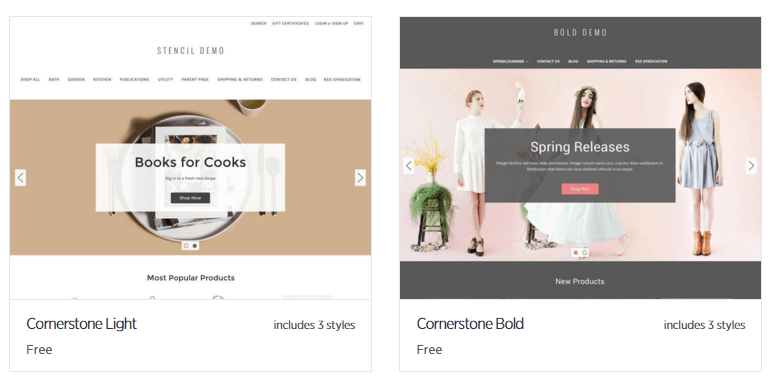
Bigcommerce Templates
At the moment, Bigcommerce offers 67 templates that range from free to $195.
7 total are the free ones, which I totally would like to see higher.
Here are a few examples so you get an idea.
Bigcommerce Shipping
They have nice solid shipping fundamentals. In fact, Michael Main from Main Performance PC stated that in 2014 they lost close to $60,000 due to misquoted shipping charges.
But since using the Bigcommerce shipperHQ (Additional Fee) which is a sophisticated shipping rate calculator and rules engine.
But since using the Bigcommerce shipperHQ which is a sophisticated shipping rate calculator and rules engine, they were able to completely cut their losses in the shipping category.
In short, it gives your customers accurate shipping charges so you’re not stuck with overages on shipping costs.
Here are some other features:
- Real-Time Quotes – real-time quotes delivered right to your customers from the top shipping companies like Fedex, USPS, and UPS
- Targeted Free Shipping – Bigcommerce lets you offer free shipping for specific zones, and products, or even by creating a coupon.
- Integrate Dropshipping – Using providers like Ordoro or Doba? You can connect your Bigcommerce store and put it on autopilot.
Bigcommerce Review On Pricing Plans – A Plan for Every Store and Every Budget
The flexibility of Bigcommerce is not only related to its design and features. Administrators for small start-up ventures or sprawling eCommerce corporations can find the ideal solution based on their budget and performance requirements.
Bigcommerce offers three primary plans. While the features and capabilities of each plan slightly vary, all are free of contracts. This means you can cancel at any time without facing penalties or fees.
Pricing Plans
- Standard Pricing – $29.95 Monthly
- Plus Pricing – $79.95 Monthly – $71.95 if paid annually.
- Pro Pricing – $249.95 Monthly – $224.95 if paid annually.
While there are some drawbacks associated with Bigcommerce, its reputation among eCommerce enterprises, and its dedication to the success of their clients, make it one of the most respected and functional eCommerce solutions today.
Want to see if its benefits are truly worth the price? Access and test-drive all of its features without paying a dime.
The best part – the trial doesn’t require a credit card, so it’s truly obligation-free.
Quick Note: It seems a large trend of chatter indicates a Bigcommerce price increase which I can’t seem to find any truth in this.
If you find different, def let me know 🙂
Bigcommerce Video Guides:
Bigcommerce guided tour: check out all the different features about it.
Things I’d Like To See Bigcommerce Improve On:
Bigcommerce Templates:
Bigcommerce actually has done a great job getting some great-looking templates for all their eCommerce builders to use.
I would like to see a lower-tiered paid version myself. So for instance, they start their premium ones at $140.
By all means, I realize a lot of work goes into these, but I’d like to see a lower premium one for around $30 to $60. Something more affordable to start out.
Do you have Bigcommerce vs Shopify on your mind?
If you’re looking to compare these two and more.
You need to start here or here to start comparing.
Bigcommerce Review Conclusion:
Bigcommerce is a solid player in the world of website builders for eCommerce website owners.
You can easily head over there and check it out and see what it is all about.
