
If you’re researching Shopify Plus, there’s a good chance your business has reached a point where you need more than a standard online store.
Maybe you’re selling in several countries, working with wholesale customers, or looking for more control over checkout.
Or maybe your Shopify store is growing, and you’re wondering whether upgrading to Plus is the next logical step.
Either way, I think it’s important to understand what you’re actually getting before spending thousands of dollars every month.
One thing I’ve always liked about Shopify is its eCommerce ecosystem.
You have your online store, payments, products, inventory, apps, and support under one roof to help run your business.
Shopify Plus builds on that foundation with additional tools for more complex business operations.
But here’s something I want to make clear right away.
Not every growing Shopify store needs Shopify Plus.
Shopify Advanced already handles a lot, and some features that people previously associated with Plus are now available on lower plans.
So, in this Shopify Plus review, I’ll explain the pricing, transaction fees, checkout customization, B2B features, integrations, support, and when I think upgrading makes sense.
Research disclosure: I have hands-on experience building and evaluating Shopify stores. I haven’t independently operated a live Shopify Plus merchant account. The Plus-specific information in this review is based on Shopify’s published documentation, not claims of personally testing an enterprise deployment. Pricing and features were checked on November 18, 2026.
Is Shopify Plus the Right Fit for Your Business?
Explore Shopify Plus to see how its enterprise checkout, B2B, and multi-store tools compare with what you’re using today.
Affiliate link. I may earn a commission at no additional cost to you.
What Is Shopify Plus?
Shopify Plus is Shopify’s enterprise-level eCommerce plan for businesses with more advanced selling and operational requirements.
It’s built on the same general Shopify platform as the regular plans.
You’re still working with familiar tools for managing products, orders, payments, customers, and your storefront.
What Plus adds is more flexibility for businesses that have outgrown certain limitations of those plans.
Key Shopify Plus Features
- Advanced checkout customization: More control over supported checkout extensions, branding, and business rules.
- B2B and wholesale: Company-specific catalogs, advanced payment arrangements, and additional wholesale capabilities.
- Multiple stores: A main store and up to nine qualifying expansion stores.
- Unlimited staff accounts: Helpful for businesses with larger teams.
- More inventory locations: Support for up to 200 locations.
- Additional API capabilities: Higher limits and specialized integration options for complex operations.
- Priority support: Round-the-clock access to priority phone and chat support.
- Specialized commerce tools: Features for advanced promotions, retail operations, and organizational management.
Now, here’s why those features matter.
A small online store with a few employees may never need hundreds of inventory locations or multiple storefronts.
But a company selling internationally, working with wholesale customers, and coordinating several departments could benefit from them.
That’s the difference I want us to focus on throughout this review.
It’s not about having the most features. It’s about having the features your business actually needs.
Shopify Plus Pricing: How Much Does It Cost?
Let’s start with one of the biggest questions.
How much does Shopify Plus cost?
Shopify publishes starting prices for standard Plus setups, although the exact cost may depend on your business and agreement.
| Contract | Monthly Cost | 12 Months of Fees |
|---|---|---|
| Three-year term | From $2,300 | $27,600 |
| One-year term | From $2,500 | $30,000 |
These are published U.S. starting prices for standard setups. The annual amounts illustrate 12 monthly payments, not the total contract commitment. More complex or higher-volume businesses may receive variable pricing.
That’s a significant investment compared with Shopify Advanced.
And something I’d pay particular attention to is the contract length.
A three-year enterprise agreement is a different commitment from subscribing to a regular Shopify plan.
What Else Can Increase the Cost?
The monthly subscription isn’t necessarily your complete operating cost.
Depending on the business, you could also pay for:
- Payment processing
- Third-party apps and integrations
- Custom development
- Migration from another platform
- ERP or warehouse management software
- Specialized fulfillment tools
- Ongoing support for custom applications
And this is where I think businesses need to be careful.
One platform might have a lower subscription price but require more development and maintenance.
Another may cost more each month but include features that replace outside software.
I’d compare the total cost of ownership rather than just the monthly subscription.
For the latest published rates, visit Shopify’s pricing comparison.
Does Shopify Plus Have Transaction Fees?
Yes, there can still be payment-related fees.
One thing that’s important to understand is the difference between Shopify’s additional transaction fees and payment processing fees.
When you use Shopify Payments, Shopify generally doesn’t charge an additional third-party transaction fee on eligible payments.
However, payment processing fees still apply.
If you use an outside payment provider, Shopify may charge an additional transaction fee on top of that provider’s charges.
Shopify’s published U.S. pricing currently lists a 0.2% third-party transaction fee on Plus.
Actual processing costs depend on your agreement, country, payment methods, and transaction details.
So, before making a decision, I’d request the specific rates that apply to your business.
Shopify Plus vs. Shopify Advanced
This is probably the most important comparison for someone already using Shopify.
Because the real question isn’t simply whether Shopify Plus is a good platform.
It’s whether the additional features justify paying substantially more than Shopify Advanced.
| Feature | Advanced | Plus |
|---|---|---|
| U.S. Subscription | $299/month billed annually or $399 monthly | From $2,300/month with a three-year term |
| Staff Accounts | 15 | Unlimited |
| Inventory Locations | 10 | 200 |
| Checkout | Standard customization and eligible apps | Additional checkout app blocks, branding, and custom functionality |
| B2B Catalogs | Up to 3 active B2B market catalog assignments | Unlimited, plus direct company catalog assignments |
| Expansion Stores | No Plus expansion-store allowance | Up to 9 qualifying expansion stores |
| Standard U.S. Online Card Rate | From 2.5% + 30 cents | From 2.25% + 30 cents |
| Third-Party Transaction Fee | 0.6% | 0.2% |
| Support | Enhanced live chat | Priority 24/7 phone and chat |
Rates reflect Shopify’s published U.S. starting prices. Payment processing and plan conditions can vary by merchant and location.
Looking at this comparison, I think the biggest differences are checkout customization, B2B capabilities, operational limits, and managing multiple stores.
But you still get a lot with Shopify Advanced.
You have a complete online store, strong selling tools, reporting, inventory management, and international selling features.
So, I’d look carefully at which Plus features you specifically need.
Could Lower Processing Fees Pay for Shopify Plus?
Potentially, but I’d run the numbers first.
For example, Shopify’s published standard U.S. online card rates start at 2.5% + 30 cents on Advanced and 2.25% + 30 cents on Plus.
That’s a difference of 0.25 percentage points.
If you’re processing $200,000 in eligible card sales every month, that difference represents approximately $500 in monthly processing savings.
However, the subscription difference between Advanced at $299 per month when billed annually and Plus starting at $2,300 per month is $2,001.
In that example, processing savings alone wouldn’t cover the subscription difference.
Of course, this doesn’t include all the other potential savings or expenses.
Maybe Plus replaces costly integrations or reduces the work your team needs to do manually.
Those are worth factoring into the decision too.
This is a simplified financial example using published rates, not a personalized quote or guaranteed break-even calculation.
Shopify Plus Checkout Customization
Checkout customization is one of the strongest reasons I’d consider Shopify Plus.
And I’m not just talking about changing the colors or adding your logo.
Shopify already provides a secure checkout experience and standard customization tools on its regular plans.
Plus adds more flexibility for businesses that need advanced checkout functionality.
What Can You Customize?
Depending on the apps and development tools you’re using, Plus supports additional functionality such as:
- App blocks on supported checkout stages
- Specialized delivery and payment options
- Additional checkout information and messaging
- Custom fields and supported order requirements
- Advanced branding through Shopify’s Checkout Branding API
- Business logic using eligible Shopify Functions and apps
Here’s why that matters.
Imagine you’re selling products where customers need to select a particular delivery date.
Rather than having someone contact you after purchasing, you may want that choice built directly into the checkout experience.
That’s a practical reason to customize checkout.
Example: Venus et Fleur Checkout

What I like about this example is that the customization serves a useful purpose.
It’s helping the customer make an important delivery decision before completing the order.
That’s the type of functionality I’d want to evaluate when considering Plus.
However, Plus doesn’t give you unrestricted control over every part of checkout.
Customizations still need to work within Shopify’s supported architecture.
So I’d verify your exact requirements before committing.
See Shopify Checkout Customization in Action
Shopify offers short demonstrations explaining checkout extensions and related tools.
If you’re considering Plus for checkout customization, I’d watch one of these before making a decision.
You can also read Shopify’s checkout customization documentation for the current plan differences.
Shopify Plus B2B and Wholesale Features
B2B is another area where Shopify Plus can make a meaningful difference.
And here’s an important point.
Shopify now offers basic B2B capabilities on Basic, Grow, and Advanced too.
That means you don’t automatically need Plus just because you want to start selling wholesale.
Where Plus becomes more valuable is when your customer relationships and payment arrangements become more complicated.
What Additional B2B Features Does Plus Offer?
- Unlimited catalog assignments: Useful when you need more than the limits on lower plans.
- Company-specific catalogs: Assign product catalogs directly to individual companies or company locations.
- Customer-specific pricing: Support negotiated prices for particular business accounts.
- Deposit requirements: Require qualifying wholesale customers to pay deposits.
- Partial payments: Handle more complex payment arrangements.
- Payment requests by fulfillment: Request payments across qualifying fulfilled portions of an order.
Let’s say you’re selling products to several different retailers.
One customer has negotiated pricing, another has a different agreement, and a third needs special payment terms.
Managing those relationships manually could become a lot of work.
That’s where Shopify Plus provides additional value.
What Does a Shopify B2B Store Look Like?
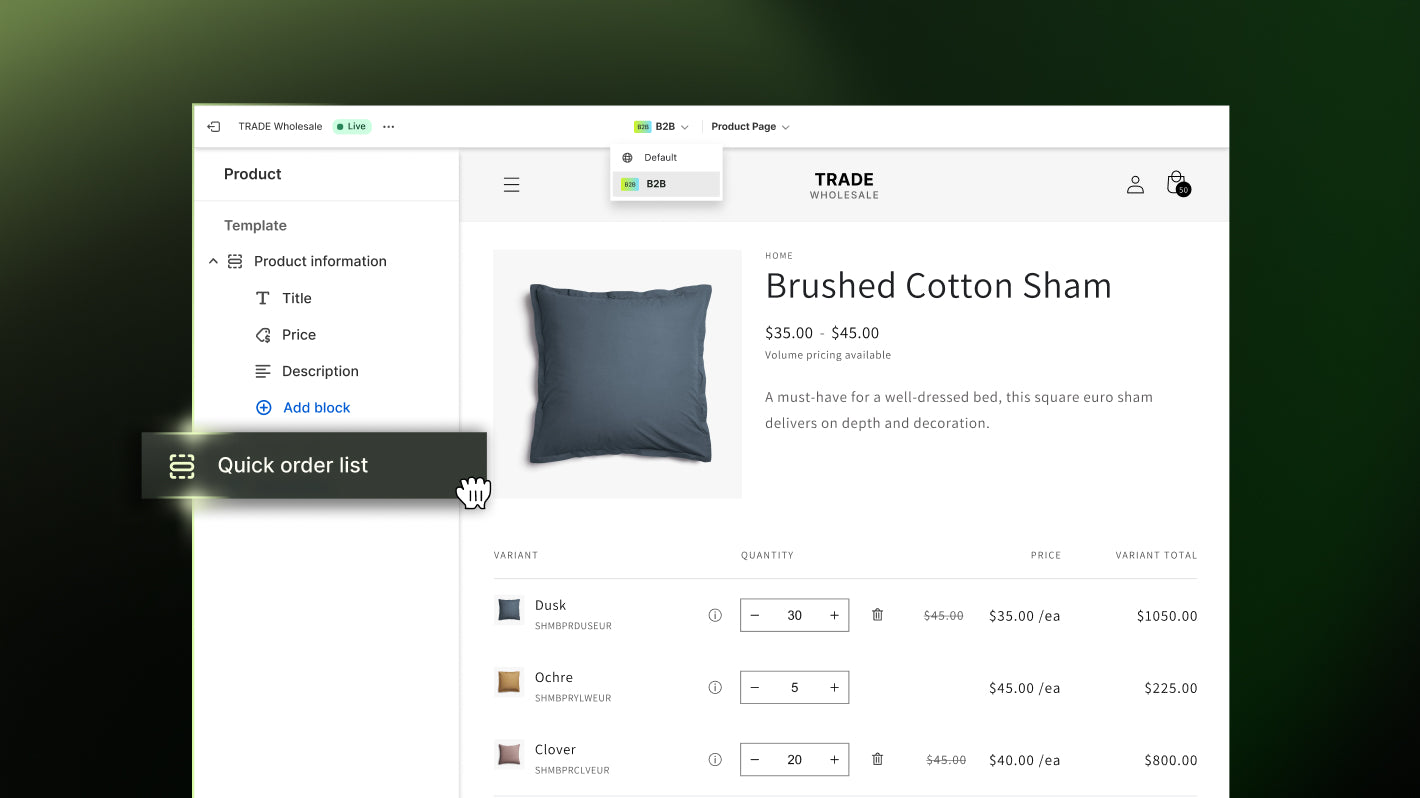
What stands out to me is how the buying experience is organized around business customers.
Someone placing a wholesale order may need to purchase dozens of units across different product variations.
They aren’t necessarily shopping the same way someone buying one item for personal use would.
Keep in mind that quick-order interfaces aren’t exclusive to Plus.
The stronger Plus advantages are its additional customer-specific catalog and payment capabilities.
You can explore Shopify’s B2B demo store to see the buying experience yourself.
When Does Shopify Plus Make Sense for Wholesale?
I’d look at how complicated your customer pricing and payment arrangements are.
If you have straightforward wholesale requirements, the regular Shopify plans may be enough.
But if you’re managing many customers with different catalogs, negotiated prices, and payment terms, Plus deserves a closer look.
If those limitations sound familiar, you can explore Shopify Plus’s enterprise commerce capabilities and compare them with your current setup.
Shopify Plus APIs, Apps, and Integrations
Another important part of Shopify Plus is its ability to connect with other systems.
For example, maybe your business already uses software for inventory, warehouse operations, accounting, or customer management.
You don’t want your employees entering the same information into several different systems if you can avoid it.
That’s where Shopify’s APIs and integrations become valuable.
What Can Shopify Integrate With?
Depending on the apps and development work involved, Shopify can connect with:
- ERP systems
- Warehouse management software
- Inventory and order management systems
- Accounting platforms
- Customer relationship management software
- Email marketing and loyalty tools
- Subscription services
- Custom business applications
These integrations can help information move between systems and reduce manual work.
Does Shopify Plus Have Better API Access?
Shopify Plus offers additional API capabilities and higher limits for certain operations.
That can be helpful when you’re working with large volumes of products, orders, or other business data.
However, Shopify’s APIs aren’t exclusive to Plus.
Many useful integrations are available on the regular plans too.
So I wouldn’t upgrade just because someone told me Plus has better API access.
I’d first confirm whether the integration you need actually requires Plus.
Shopify Plus Apps
Shopify’s App Store is still one of the parts of the platform I like most.
It allows businesses to add functionality without having to build everything from scratch.
For example, you might use apps for:
- Email marketing and automation
- Customer loyalty programs
- Subscription management
- Advanced product search
- Warehouse and fulfillment operations
- Reporting and customer analytics
But here’s the tradeoff.
Apps can increase your monthly costs, and some require additional maintenance or development.
I’d start with the business problem you’re trying to solve and then decide whether Shopify already handles it or whether an app makes sense.
That’s how I’d approach building an eCommerce system that remains manageable as your business grows.
Managing Multiple Stores and International Markets
If you’re selling internationally or running multiple related storefronts, Shopify Plus has additional tools worth exploring.
One of those is the ability to run up to nine qualifying expansion stores alongside your main store.
These can be useful when a business needs separate storefront configurations for different operational or international requirements.
However, expansion stores have eligibility conditions and can require separate theme licenses.
I’d also point out that Shopify Markets already provides international selling features on lower plans.
So, you don’t automatically need Plus to sell in another country.
The question is whether your business needs separate stores or additional organizational control.
Unlimited Staff Accounts
Shopify Plus also supports unlimited staff accounts.
That can be useful when several people or departments are managing your business.
For example, you might have employees responsible for marketing, inventory, customer support, fulfillment, and accounting.
Appropriate user permissions help keep those responsibilities organized.
For a smaller team, this may not be an important difference.
For a larger operation, it could be.
Shopify Plus Scalability and Performance
Shopify Plus is designed to support larger and more complicated eCommerce operations.
One advantage of Shopify is that it’s a managed platform.
You don’t need to maintain your own commerce servers or handle the underlying infrastructure updates yourself.
That can reduce some of the technical work involved in running an online business.
However, I think it’s important to separate platform scalability from storefront performance.
Even with Shopify Plus, your theme, images, third-party apps, and custom code can affect how quickly your website loads.
Upgrading to Plus isn’t a guaranteed solution for a slow storefront.
If performance is the problem, I’d identify the actual cause before spending more money on a plan.
Flash Sales and Product Launches
For businesses running major product launches or high-demand promotions, Shopify Plus offers specialized tools such as Launchpad and bot protection.
These can help with scheduling and managing certain promotional events.
I’d still test the complete purchasing process before a major launch, including product pages, inventory, checkout, apps, and fulfillment.
Having a scalable platform helps, but it doesn’t replace proper preparation.
Shopify Plus Customer Support
Support is something I’ve always put a lot of value on when testing website-building platforms.
Picture running a large online store and suddenly having a problem with checkout or another important part of your business.
Where can you turn?
Shopify Plus includes priority 24/7 support with phone and chat options.
That’s valuable when your business needs assistance with platform-related problems.
However, not every problem is necessarily something Shopify can fix for you.
Custom development, specialized integrations, and certain third-party apps may require help from the developers or providers responsible for them.
Shopify also has a partner ecosystem where businesses can find development and implementation assistance.
That’s a nice part of having a larger platform ecosystem behind your business.
Before signing up, I’d clarify exactly what account-management and support services are included in your agreement.
That way you know where to turn when something goes wrong.
Shopify Plus Migration: Moving From Another Platform
If you’re moving an established eCommerce business to Shopify Plus, there’s quite a bit to think about.
You’re not just moving a few website pages.
You may be transferring products, customers, orders, inventory systems, payment providers, and several other business processes.
That requires planning.
What Should You Review Before Migrating?
- Products: Can your catalog, variations, and product information transfer correctly?
- Customers: How will customer accounts and login information be handled?
- Orders: What happens to your historical order data?
- Inventory: Will your inventory and fulfillment systems continue to synchronize?
- URLs: What redirects are needed for important existing pages?
- Payments: Can you continue using your preferred payment methods?
- Integrations: Which systems need to be rebuilt or replaced?
- Testing: How will you verify checkout, shipping, taxes, and fulfillment before launch?
Shopify provides migration documentation and access to experienced partners who can help businesses move.
But I would confirm exactly what assistance is included and whether outside development costs apply.
My approach would be to document your most important business workflows first.
Then make sure you understand how each one will operate after the migration.
You can also review Shopify’s Plus launch checklist.
Shopify Plus Disadvantages
Shopify Plus offers plenty of useful features, but I wouldn’t call it the right platform for every business.
1. The Cost Is Significant
Starting at $2,300 per month on a three-year commitment is a substantial investment.
I’d want a clear financial or operational reason before making that decision.
2. You’re Still Working Within Shopify’s Platform
Shopify is a managed SaaS platform.
You don’t have unrestricted access to its underlying servers and database in the same way you would with a fully self-hosted eCommerce system.
For many businesses, that’s a benefit because Shopify handles much of the infrastructure.
But it can limit certain development requirements.
3. Third-Party Costs Can Add Up
Apps, integrations, development work, and outside services can increase your operating costs.
Shopify Plus isn’t an all-inclusive replacement for every business tool.
4. Content Management Has Tradeoffs
Shopify includes blogging and content pages, but it isn’t a dedicated publishing platform like WordPress.
If your business depends heavily on editorial content or specialized publishing workflows, I’d compare those requirements carefully.
That doesn’t automatically make Shopify a bad choice for SEO.
It just means the content management system needs to fit how your business operates.
5. Not Every Business Needs the Additional Features
It’s easy to look at a long feature list and think the most expensive plan must be the best option.
But if you aren’t using those features, you’re paying for functionality your business may not need.
And that isn’t necessarily a smart investment.
My recommendation: Identify the specific limitations you’re experiencing and determine whether Shopify Plus solves them before upgrading.
Have You Reached the Limits of Your Current Shopify Plan?
If checkout restrictions, wholesale pricing, integrations, or multi-store management are creating real challenges, compare those requirements with Shopify Plus before committing to an upgrade.
Affiliate link. I may earn a commission at no additional cost to you.
Shopify Plus vs. Adobe Commerce
Another platform that comes up when researching enterprise eCommerce is Adobe Commerce, previously known as Magento Commerce.
The biggest difference is how these platforms approach the underlying technology.
Shopify Plus is a managed SaaS platform with hosting, checkout, core store functionality, and a large ecosystem of apps and integrations.
Adobe Commerce can provide greater architectural flexibility for certain custom implementations, although those projects may require additional development and technical management.
I wouldn’t call one the automatic winner.
For a large business, the right choice depends on your existing systems, development resources, implementation costs, and operational requirements.
That’s what I’d focus on rather than simply comparing the number of features each platform offers.
Is Shopify Plus Worth It?
So, after looking through the features and pricing, is Shopify Plus worth it?
My answer is that it can be, but only when your business has a specific reason to need it.
When I’d Consider Shopify Plus
- You need advanced checkout customization that isn’t available on Advanced.
- You manage complicated wholesale customer pricing or payment arrangements.
- You need additional expansion stores or organizational controls.
- You require more staff accounts or inventory locations.
- You have integrations that need Plus-only capabilities or higher API limits.
- The additional tools provide enough operational or financial value to justify the cost.
When I’d Stay With Shopify Advanced
- Your current checkout already meets your business needs.
- You don’t need Plus-only B2B functionality.
- Your team fits within Advanced’s staff limits.
- You don’t need separate expansion stores.
- Your current integrations work properly.
- The additional Plus subscription cost doesn’t provide enough value.
One thing I wouldn’t use is an arbitrary revenue threshold.
A store generating substantial sales may still be perfectly fine on Advanced.
Another business with lower revenue could have complex wholesale or checkout requirements that justify Plus.
For me, it’s about the business requirements and what the platform actually improves.
If those Plus-only capabilities are important to your operation, it’s worth reviewing Shopify Plus with its enterprise team to understand the applicable pricing and contract terms.
Can You Try Shopify Plus Before Committing?
Shopify offers an eligible paid trial for Plus.
At the time of this review, the published U.S. trial price is $399 per month.
The trial lasts one or two months depending on the store’s eligibility and status.
That’s different from Shopify’s ordinary free trial.
And something important to understand is that the Plus trial doesn’t necessarily include every capability of the complete Plus plan.
I’d review the trial limitations before using it to evaluate advanced features.
Here’s another important point.
If you don’t take action before the Plus trial ends, Shopify says your store automatically transitions to a full Plus subscription under the terms selected during setup.
So, I’d review those conditions carefully before starting.
You can read Shopify’s official Plus trial terms for the current eligibility and requirements.
What I’d Ask Shopify Before Signing Up
If I were evaluating Shopify Plus for an established business, I’d want some clear answers before agreeing to the contract.
- Pricing: What is my actual monthly platform cost, and could variable pricing apply?
- Payment fees: What processing and additional transaction fees apply to my business?
- Checkout: Can Shopify support the specific checkout requirements I need?
- Integrations: Which existing business systems will work, and what might require development?
- Migration: What assistance is included and what outside costs should I expect?
- Support: What support and account-management resources are included?
- Contract: What are the renewal, cancellation, and commitment terms?
I think these questions are much more valuable than simply asking whether Shopify Plus is the best Shopify plan.
They help you understand whether Plus is actually a good fit for your business.
Shopify Plus FAQ
How Much Does Shopify Plus Cost?
Shopify Plus starts at $2,300 per month on a three-year term or $2,500 per month on a one-year term for standard U.S. setups.
More complex businesses may receive variable pricing, and additional costs for apps, integrations, development, and payment processing can apply.
What Is the Difference Between Shopify and Shopify Plus?
Regular Shopify plans provide the core tools needed to build and run an online store.
Shopify Plus adds more advanced checkout customization, higher operational limits, company-specific B2B features, expansion stores, and priority support.
Does Shopify Plus Have Transaction Fees?
Shopify Plus still has payment processing fees.
Additional third-party transaction fees may apply when using an outside payment provider. The published U.S. third-party transaction fee for Plus is 0.2%, subject to applicable terms.
Does Every Large Shopify Store Need Plus?
No. Shopify Advanced can support a substantial online business.
The decision should depend on your requirements, costs, and whether you need Plus-specific capabilities.
Is Shopify Plus Good for B2B?
Yes. Shopify Plus offers advanced B2B features, including unlimited catalog assignments, direct company catalogs, deposits, and partial payment arrangements.
Some B2B capabilities are also available on Shopify’s lower plans.
Can I Upgrade From Shopify Advanced to Plus?
Yes. Existing Shopify merchants can explore upgrading as their business requirements grow.
I’d confirm the current contract, pricing, and feature differences before making the switch.
Does Shopify Plus Include Hosting and Security?
Yes. Shopify manages the underlying hosting and much of the platform infrastructure, including core security responsibilities.
Merchants still need to manage staff access, third-party applications, and their own operational security.
Does Shopify Plus Have a Free Trial?
Shopify offers an eligible paid Plus trial rather than a free trial.
The published U.S. price is $399 per month for one or two months, depending on eligibility.
The trial can automatically transition to a full Plus subscription unless action is taken before it ends.
Shopify Plus Review Conclusion
Shopify Plus is a powerful option for businesses with more complex eCommerce requirements.
What I like most about Shopify overall is its ecosystem.
You’ve got the online store, payments, apps, order management, and other selling tools working together.
Plus builds on that by providing more advanced functionality for checkout, wholesale operations, multi-store management, and larger teams.
But I wouldn’t upgrade just because your company is growing.
I’d first compare your current plan against the specific features you need.
If Shopify Advanced is already handling everything well, there’s value in staying where you are.
And if you’re running into limitations that create additional work or costs, that’s where Shopify Plus becomes much more interesting.
My overall recommendation: Look at your business requirements, calculate your total operating costs, and confirm exactly what’s included before committing.
That gives you a much better basis for making the decision.
Ready to Compare Shopify Plus for Your Business?
If you’ve identified the advanced features your business needs, the next step is to discuss your requirements, pricing, and contract options with Shopify’s Plus team.
Affiliate link. I may earn a commission at no additional cost to you.
If you’re still comparing your options, you can also check my Shopify guide, Shopify pricing plans comparison, and best eCommerce website builders guide.
I’d love to hear your thoughts: If you’re already using Shopify Plus or considering an upgrade, what’s driving that decision? Is it checkout customization, B2B selling, integrations, or something else?
I’m interested in hearing what makes the additional investment worthwhile for different businesses.

[…] Shopify offers a wider range of pricing plans, from the $29/month Basic Shopify plan to the $2,000/month Shopify Plus Plan. […]