You’re probably here for one reason.
You want the real cost of Shopify Plus, without the fluff.
Maybe you’re trying to figure out:
- What Shopify Plus actually starts at each term (1-year vs 3-year)
- What’s included in that price
- What extra costs sneak in (payments, apps, build, migration)
- If there’s any room to negotiate, or if the price is the price
That’s exactly what I’m breaking down in this post.
We’ll walk through the Plus platform fee, the payment and transaction fee side of things, and the “real world” costs that usually show up once you start building a serious store.
Let’s get into it.
Shopify Plus Pricing Summary
| Info | Quick answer |
|---|---|
| Best way to “try it” | Try regular Shopify first to test the dashboard, themes, products, checkout, and apps. Plus is usually sales-led. |
| Starting price (3-year term) | From $2,300/month on a 3-year term (standard setups). |
| Starting price (1-year term) | From $2,500/month on a 1-year term. |
| When pricing becomes variable | Some higher-volume or complex brands move to a variable platform fee based on revenue and business model. |
| Contract style | Plus is a contract plan, so the final number depends on your needs and volume. |
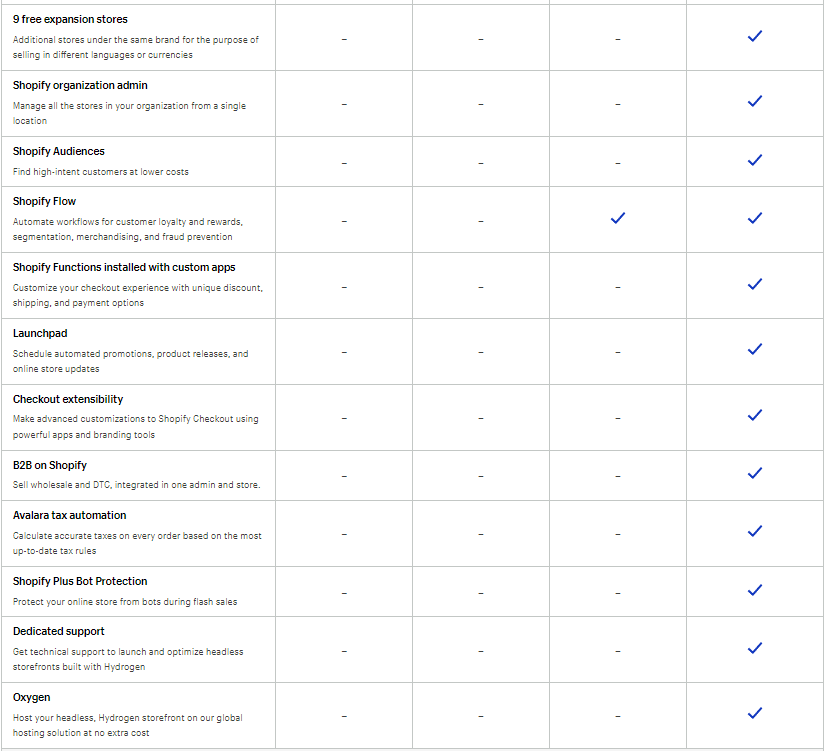
| Stores included | Main store plus up to 9 expansion stores included. |
| Extra stores | Extra stores can be $300/month per store or revenue share, depending on the deal. |
| Payment processing | You still pay card processing fees (rates vary by country and agreement). |
| Extra transaction fees? | Usually no extra Shopify transaction fee if you use Shopify Payments. If a third-party gateway is your primary processor, an extra fee may apply. |
| Migration cost | Shopify doesn’t charge a “migration fee.” Costs are usually partner/dev work, integrations, theme rebuilds, data cleanup, and QA. |
| What increases the real monthly cost | Apps, custom dev, ERP/3PL integrations, headless builds, tracking setup, POS hardware, and ongoing support. |
| Best way to get an exact quote | Talk to Shopify Plus sales to get your exact pricing. |
See Shopify Plus
The Shopify Plus Fee To Use This Platform
Shopify Plus is a contract plan, so the “platform fee” isn’t always one fixed number for every brand.
But here’s the clean way to think about it.
Most people start at the minimum monthly fee.
Shopify publicly lists Plus starting at:
- $2,300/month on a 3-year term (standard setups)
- $2,500/month on a 1-year term
That’s the baseline a lot of brands land on when they first move up to Plus.
You’ll see some claim stuff like “once you hit $800,000/month it becomes 0.25% of revenue.”
The problem is Shopify doesn’t publish one universal breakpoint or one universal percentage anymore.
What Shopify does say is that some higher-volume or more complex businesses move to a variable platform fee based on revenue and business model.
So the honest recap looks like this:
If you’re a standard setup, expect the base monthly minimum.
If you’re higher volume or more complex, expect Shopify to quote a revenue-based platform fee.
And either way, remember this is only the platform fee. Payment processing, apps, and any custom work you add on are separate.
Cost To Build Out A Website With Shopify Plus
Shopify Plus lets you use the same pre-made themes you’d use on other Shopify plans, so you can absolutely build a clean store without paying an agency.
But quick reality check.
Your build cost might be low, but it’s rarely “zero” once you factor in things like a paid theme, apps, product photos, copy, and any setup help you end up wanting.
If you hire a web design team or agency, your total cost depends on what you’re actually building.
Here are the biggest things that move the price up fast:
- The team you hire (freelancer vs Shopify Plus Partner agency)
- How many products and templates you need (product pages, collections, landing pages)
- How many regions you’re selling in (multiple storefronts, currencies, languages)
- Integrations (ERP, 3PL, OMS, POS, subscription tools, loyalty, analytics)
- How custom you go (theme customization vs fully custom build or headless)
A simple way to budget this without getting weirdly specific:
- Lean build using a theme (you or light help): lower cost, fastest launch
- Theme customization + brand polish (designer/dev help): mid-range
- Custom design + heavier functionality (agency build): higher cost
- Complex build with deep integrations (enterprise style): highest cost
If you’re hiring it out, a wide but realistic range is usually somewhere between $20K to $275K, depending on how custom and integration-heavy you go.
My recommendation if you’re trying to stay smart with money:
Start with a theme-based build, launch, prove the offer, then invest in the custom stuff once you know what’s actually making sales.
Shopify Plus Credit Card Transaction Fees
This part is way easier when you split it into two buckets.
1) Credit card processing fees
If you use Shopify Payments as your primary gateway, you pay Shopify the online and in-person card fees.
The exact rate depends on your country and your agreement, so I wouldn’t lock this section to one “forever” percentage. If you want the most accurate number, check the current rates tied to your store or get them directly from Shopify.
2) Extra fee if you use a third-party processor as your primary gateway
If a third-party processor is your primary payment gateway, you’re stacking two costs:
- Your processor’s fees
- Plus Shopify’s extra fee (on Plus this is commonly listed as 0.20% per transaction for security and compliance)
Payment gateway options
If you’re not using Shopify Payments, Shopify supports a large list of other payment providers, so you do have flexibility. Just remember every provider has their own pricing, payout timing, and rules.
Quick recap
Your payment costs on Shopify Plus usually come down to:
- Card processing fees (Shopify Payments or your processor)
- If your primary gateway is third-party, an extra Shopify fee can apply too
Shopify Plus App Fees

Estimated cost: $0 to $1,000+ per month (it can go higher if you stack a lot of tools)
Apps are the easiest part of Shopify Plus to underestimate.
Not because you can’t find free apps.
You can.
It’s because Plus stores usually add apps to solve real problems fast, and those monthly charges add up quietly.
What you’re usually paying for
Here are the most common “app buckets” that push costs up:
- Conversion tools (upsells, bundles, cart boosters)
- Subscriptions and memberships
- Loyalty and rewards
- Email and SMS marketing
- Reviews and UGC
- Shipping, returns, and fulfillment tools
- Reporting, attribution, and tracking
- Integrations (ERP, 3PL, accounting, data syncing)
- B2B rules and customer pricing logic
The part people don’t talk about
Apps don’t just cost money.
Too many apps can also slow your store down, create conflicts, and make your setup harder to maintain.
So I treat apps like this:
If it makes you money or saves you time, keep it.
If it’s not clearly paying for itself, it’s clutter.
My simple rule
Start lean.
Add apps only when you hit a problem you can’t solve with Shopify’s built-in features.
Then do a quick monthly app audit:
- Keep what you use
- Replace duplicates
- Remove anything that doesn’t earn its spot
Maintenance Fees
One of the biggest perks of Shopify Plus is that it’s hosted for you.
So you’re not dealing with the usual “maintenance pile” that comes with self-hosted sites, like:
- Server hosting and uptime monitoring
- Security updates and patches
- Platform upgrades and compatibility fixes
- Managing PCI and basic compliance stuff (as part of the platform)
That’s a big deal because it keeps your baseline technical overhead lower and removes a lot of the surprise costs that come from babysitting a site.
But here’s the honest part.
Your “maintenance fees” don’t disappear. They just shift.
Most Plus brands still spend money maintaining things like:
- Theme and design updates
- App management (adding, removing, troubleshooting)
- Ongoing optimization (speed, conversion rate, UX improvements)
- Developer support for custom features and integrations
- Tracking and analytics upkeep
So if you’re running Plus lean, maintenance can be light.
If you’re running a more complex setup with custom work and multiple integrations, your maintenance is usually a monthly retainer with a dev or agency.
Is There Any Room For Negotiation?
Shopify Plus is a contract plan, so it’s not a “coupon code” situation where you bargain the base price down.
What you can control
- Term length
- 1-year vs 3-year term
- This is what usually sets your baseline monthly minimum
- How your pricing is structured
- If you’re higher volume or more complex, Shopify may move you to a variable platform fee
- That number is quote-based and depends on your revenue and business model
Where you may have more wiggle room
Payment-related details
Card rates and processing terms can vary by country and agreement, so if payment costs hit your margins hard, that’s worth bringing up during the sales process.
Costs To Migrate To Shopify Plus
If you’re brand new and starting on Shopify from day one, you can skip this part.
But if you’re moving from another platform, migration is one of those areas where the cost can swing a lot.
Here’s the honest way to look at it:
Shopify doesn’t really charge a simple “migration fee.”
Your cost comes from the work required to move your store and make sure everything still works when you flip the switch.
What usually decides the migration cost
- How clean your current data is (products, customers, orders)
- How many SKUs, variants, collections, and images you have
- Any custom features you rely on today (subscriptions, bundles, B2B pricing rules)
- Integrations you need to rebuild (ERP, 3PL, shipping tools, analytics)
- How custom your front end is (theme edits vs custom build)
What data is commonly transferred
- Products (including variants, images, and collections)
- Customers (accounts, tags, segments)
- Orders (history, statuses)
- Discounts, gift cards, and basic settings (depending on platform and method)
- Content pages and blog content (if you want it carried over)
A smart way to approach it
If you’re hiring this out, shop around.
Get 3 to 5 quotes and make sure each one answers these questions clearly:
- What’s included vs not included
- Who handles redirects and SEO cleanup
- How they’ll test checkout and key flows before launch
- What integrations they’ll rebuild and validate
- What post-launch support looks like
Can you do it yourself?
Sometimes, yes.
If your setup is simple, you can migrate a lot of the basics yourself with exports/imports and a few tools.
If you’re moving a more complex store, the expensive part usually isn’t moving the data.
It’s rebuilding the systems around it and making sure nothing breaks when real orders start coming in.
Shopify POS Pro For Shopify Plus Pricing
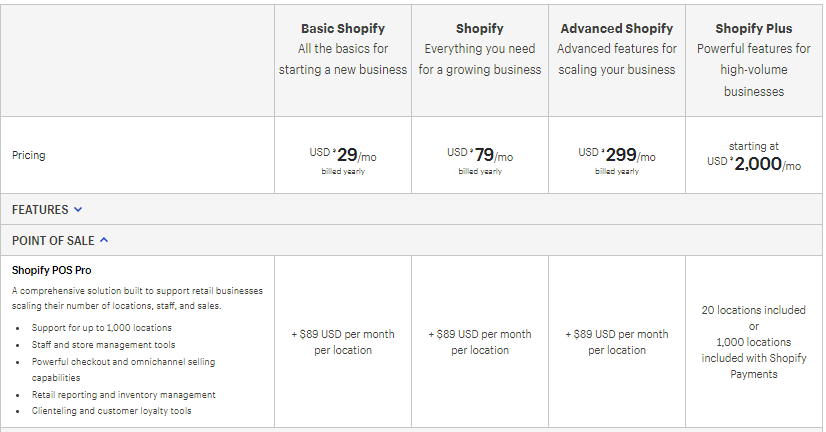
In my opinion, one really low-key feature is what you get with Shopify Plus in the POS world.
The fact you have key things such as
- Supports up to 1,000 locations with Shopify Payments
- Staff and management tools
- Retail and reporting and inventory
Overall it’s nice to realize this and know the value added to the Shopify Plus pricing plan
Is there anybody to help me set it up?
Being a Shopify Partner I can reach out to the team and discuss your info and have someone reach out to you to help get all you’re questions answered.
If that is something you have an interest in just get a hold of me on my contact page.
I just feel it might be the easiest route.
Compare Shopify Plus Pricing To The Other Shopify Plans
If you’re deciding on Shopify Plus, the fastest way to make a smart choice is to compare it to the plan you’d actually use if Plus didn’t exist.
Also, Shopify shows yearly pricing discounts on the pricing page, so make sure you’re not mixing “billed yearly” numbers with true month-to-month pricing.
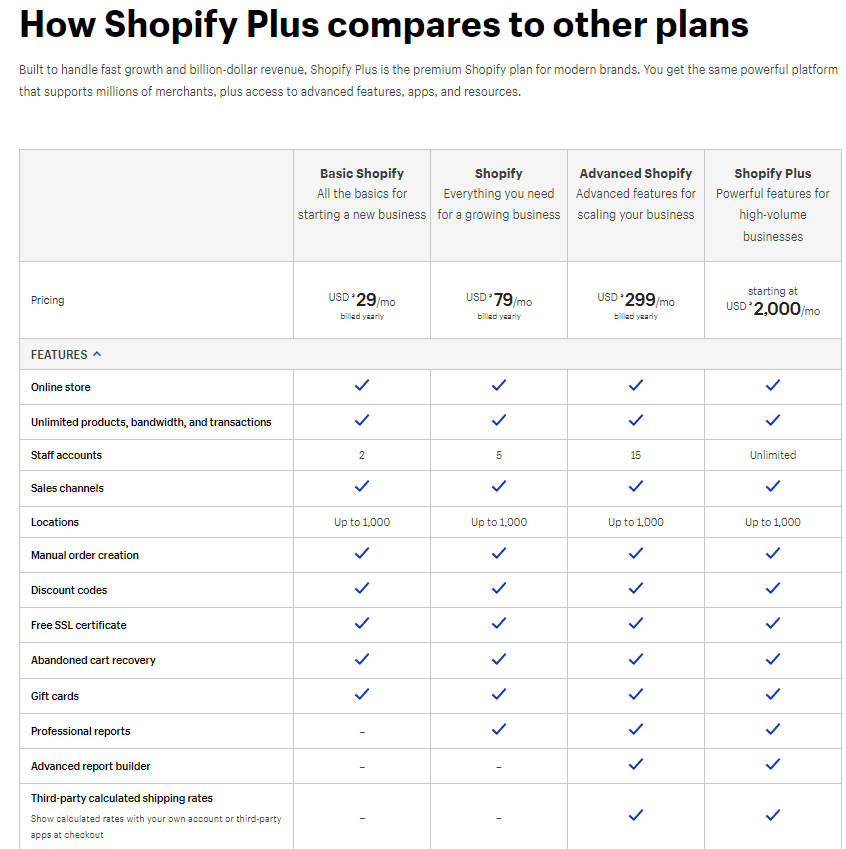
Shopify plan pricing snapshot (starting prices)
Starter: $5/month
Basic: $29/month (billed yearly)
Grow: $79/month (billed yearly)
Advanced: $299/month (billed yearly)
Plus: from $2,300/month (3-year term) or from $2,500/month (1-year term)
Here is a full Shopify pricing breakdown to help decide more
Third-party transaction fees (if you don’t use Shopify Payments)
This is the extra fee Shopify charges on top of whatever your payment processor charges.
Basic: 2%
Grow: 1%
Advanced: 0.6%
Plus: contract-based, but commonly shown as 0.20% per transaction when a third-party processor is your primary gateway
What changes as you move up plans
1) You pay for leverage, not just features
Basic is for getting the store live and selling.
Grow is for running a store with a small team and more momentum.
Advanced is for scaling operations and needing deeper reporting and shipping tools.
Plus is for stores that are high volume or operationally complex.
2) Plus is priced differently
Basic, Grow, and Advanced are “pick a plan and pay monthly.”
Plus is a contract plan.
You pick a term, and some businesses move to a variable platform fee depending on revenue and business model.
3) Your real cost is rarely just the plan
Regular plans are usually:
Plan fee + payment processing + a few apps
Plus usually becomes:
Platform fee + payment processing + apps + integrations + ongoing optimization/support
My simple rule
If you’re still testing products or building your first real sales engine, start with Basic, Grow, or Advanced and keep your tech stack lean.
If you’re already doing serious volume, need multiple markets, heavy integrations, B2B workflows, or a more customized setup, Plus starts to make sense because it becomes a cleaner operating system for the business.
Shopify Plus Pricing FAQ
What is the starting price for a Shopify Plus monthly subscription?
Shopify Plus starts at $2,300 per month for standard setups on a 3-year term, or $2,500 per month on a 1-year term. That base pricing is the common starting point for many merchants moving into Plus.
How much does Shopify Plus cost for high-revenue stores?
For higher-volume or more complex businesses, Shopify may move pricing from the flat monthly minimum to a variable platform fee based on revenue and business model. Because this is contract-based, the exact number depends on your setup and volume.
Are there additional Shopify Plus transaction fees when using third-party payment processors?
Yes. If a third-party payment processor is your primary gateway, Shopify can charge an additional 0.20% per transaction on Shopify Plus, on top of whatever your payment provider charges. If you use Shopify Payments, this extra Shopify fee typically doesn’t apply.
What Shopify Plus payment processing fees apply when using Shopify Payments?
When you use Shopify Payments, you pay the normal card processing fees based on your country and agreement, but you generally avoid the extra third-party transaction fee Shopify applies when a third-party gateway is your primary processor.
Does Shopify Plus pricing include setup and onboarding costs?
Your Plus subscription covers the platform and the plan-level features. Some merchants get basic onboarding support as part of the Plus experience, but design work, custom builds, and complex integrations are usually separate costs.
How does Shopify Plus pricing work for B2B transactions?
B2B on Plus is included as a capability, but any additional B2B transaction fees are contract-dependent. If you’ve been quoted a specific percentage for B2B, keep it, but don’t present it as a universal fee that applies to every Plus merchant.
Can I get a discount on Shopify Plus pricing with longer-term commitments?
Yes. The 3-year term is typically cheaper per month than the 1-year term (that’s why you’ll see the $2,300 vs $2,500 difference).
What happens to Shopify Plus pricing when my revenue exceeds the threshold?
There isn’t one public “magic threshold” that applies to every store. In general, when your volume and complexity rise, Shopify can move you to a variable platform fee based on revenue and your business model.
Are there hidden costs beyond the base Shopify Plus pricing?
Not hidden, but a lot of people forget to budget for the real add-ons:
- Payment processing
- Apps (subscriptions, loyalty, upsells, tracking, shipping/returns)
- Theme work or custom development
- Integrations (ERP, 3PL, OMS, accounting)
- Ongoing support or a dev retainer
How does Shopify Plus pricing compare to regular Shopify plans for enterprise businesses?
Plus costs more, but you’re paying for enterprise-level features, scalability, and a higher-touch support experience. It tends to make sense when you’re doing meaningful volume, need advanced workflows, or you’re tired of workarounds.
What payment methods are included in Shopify Plus pricing without extra fees?
If you use Shopify Payments, you generally avoid Shopify’s extra third-party transaction fee for orders processed through Shopify’s payment options. Manual payment methods (like cash or cash on delivery) don’t trigger third-party processing fees because there’s no card processor involved.
Is Shopify Plus pricing negotiable for large enterprise accounts?
The base starting terms are pretty standard, but Plus is still contract-based. Larger or more complex businesses may have room to discuss how pricing is structured, especially if they land on a variable platform fee.
What support is included in Shopify Plus pricing?
Shopify Plus includes a higher level of support than standard plans, with priority-style help and Plus-specific guidance/resources designed for bigger stores.
Shopify Plus Pricing Conclusion
If you’re pricing out Shopify Plus, here’s the simple takeaway.
What you’re really paying for
- The Plus platform fee (contract)
- Payment processing (this can be a big chunk)
- Apps (keep it lean or it adds up fast)
- Any build, integrations, or ongoing support
Why people still choose Plus
- It scales without a bunch of workarounds
- You get a more hands-on experience than standard plans
- It’s built for brands that need speed, stability, and control
Next steps
- Learn more about Shopify Plus pricing and what’s included
- Want help deciding if Plus even makes sense for you? Contact me.
If you reach out, send 3 quick details:
- What you sell
- Rough monthly order volume
- What platform you’re on now
I’ll help you map the cleanest path forward and the right questions to ask before you commit.
Some key sources for research I used

Leave a Reply