| My Quick Verdict On Framer Vs Shopify
Based on all my research and testing If you are building a real online store, I’m picking Shopify. It has the full ecommerce engine, it keeps you on track, and it scales without needing a bunch of workarounds. If you are building a design-first site where the main goal is the look and feel, Framer can be a great pick if your OK figuring out the eCommerce side. The simple rule
|
Deciding between Shopify and Framer for your next website project?
Yeah, you’re not alone.
These two platforms get compared a lot, but here’s the weird part. They’re not really built for the same “main job.”
Shopify is built to help you sell. Products, checkout, payments, shipping, the whole thing.
Framer is built to help you design. Clean pages, modern layouts, animations, and that “wow this site looks legit” feel.
So if you’re sitting there thinking, “Which one is better?” the real question is:
What are you trying to do first?
- Are you trying to launch a real store and start taking orders?
- Or are you trying to build a beautiful website that shows your brand off?
In this Framer vs Shopify comparison, I’m going to break it down in plain English.
I’ll show you what each platform is best at, where each one gets annoying, what it actually feels like to use them, and which one I’d pick depending on your goal.
Let’s get into it.
| Key testing + research for Framer vs Shopify: I signed up for both, built a full demo project on each platform, and ran everything through my repeatable 25+ point checklist so I catch the small stuff that makes a builder feel smooth or frustrating. I tested the core flows end-to-end, including building pages, adding products, so I could see what customers actually experience. I also tested customer support with real questions, then cross-checked what real users are saying in communities and looked for patterns instead of one-off complaints. After that, I compared Framer and Shopify side by side using the same checklist and dug into pricing and fine print so you know what’s included, what costs extra, and which discounts are actually legit. For full transparency, I document my full testing process here: you can as well see all my top ecommerce builders.
|
Framer Vs Shopify Summary
| Feature | Shopify | Framer |
|---|---|---|
| Best For | Dedicated eCommerce businesses of all sizes | Design-focused first brands, startups, and creatives |
| Ease of Use | Beginner-friendly with drag-and-drop store builder | Intuitive, but requires some design knowledge |
| Customization | Uses themes and Liquid code for deep customization | Highly flexible with visual design freedom |
| E-Commerce Features | Comprehensive: inventory, payments, marketing, analytics | Basic: relies on third-party integrations for e-commerce |
| Payment Processing | Shopify Payments + 100+ third-party gateways | Limited, needs integrations for checkout |
| SEO & Marketing | Built-in SEO, email marketing, social selling |
Basic SEO, requires manual optimization |
| Performance & Hosting | Fast, secure, and optimized for e-commerce | Fast, but depends on external integrations for e-commerce |
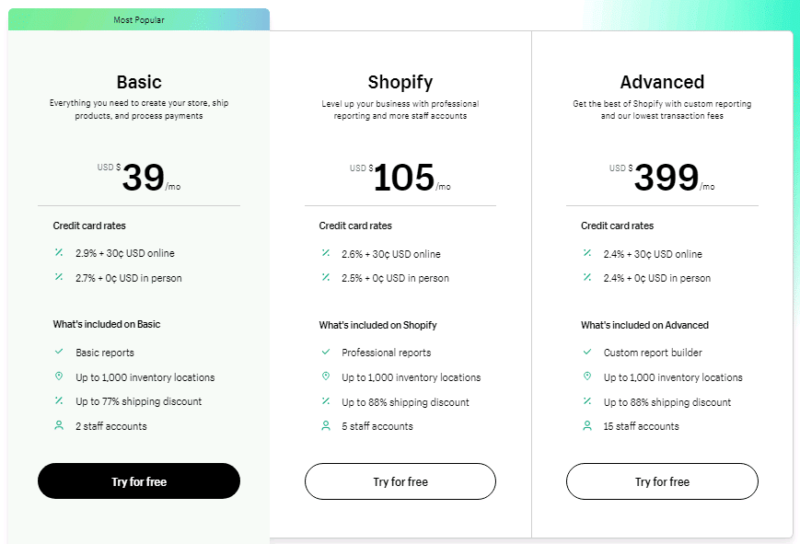
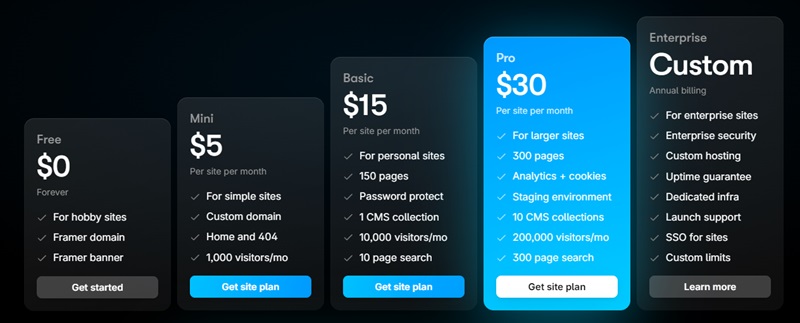
| Pricing | Starts at $39/month (Basic) + transaction fees | Starts at $5/month, but e-commerce requires workarounds |
| Scalability | Ideal for small to enterprise-level stores | Best for small businesses and portfolios |
| Support | 24/7 customer support, extensive documentation | Community support, limited direct support |
| Overall Rating | 4.63 out of 5 (Based on customers and my own testing results) | 3.975 out of 5 (Based on customers and my own testing results) |
| Quick Verdict | Shopify is the best choice to help you build an online store. |
Great if design first is your goal. |
Ratings Breakdown Summary
| Shopify Vs Framer On Ratings | Shopify | Framer |
|---|---|---|
| Ease of use | 4.6 out of 5 | 4.1 out of 5 |
| Customer Support | 4.9 out of 5 | 3.6 out of 5 |
| Tools it offers (Marketing, SEO, Product Tools) | 4.6 out of 5 | 4.3 out of 5 |
| 25-point feature checklist | 4.6 out of 5 | 4.4 out of 5 |
| Testing project | 4.6 out of 5 | 4.4 out of 5 |
| Customer User Rating Score | 4.5 out of 5 based on 6,280 customer users | 3.45 out of 5 based on 38 users |
| Overall rating | 4.63 out of 5 | 3.975 out of 5 |
Best for Online Selling: Shopify easily wins
| Test Note: I tested this like I was actually launching, not just clicking around features. On Shopify, I did the full setup a real store needs, including a product with variants, shipping rates, taxes, and a complete test checkout from product page to confirmation. With Framer, I treated it like what it really is for selling online, a storefront, so I built the pages and then tested two real-world setups: Shopify to Framer using a plugin so Shopify still handles products, cart, and checkout, plus simple Stripe checkout links for a quick “buy now” flow. Framer can look amazing, but Shopify is still the stronger choice for commerce because the whole selling system is built in and connected, while Framer only sells as well as the backend you plug into it. This one isn’t even close. Chris Pontine: Lead Researcher & Tester |
If your goal is to run a real online store (multiple products, orders coming in daily, customers asking shipping questions, refunds, inventory changing), Shopify is built for that life.
Framer is not.
Shopify is a selling machine by default
When you log into Shopify, the whole admin is basically pushing you toward “get products up, make checkout easy, start selling.”
You don’t have to invent the store setup. You’re stepping into a system that’s already designed around ecommerce.
Here’s what Shopify gives you out of the box (the stuff that matters):
- Product listings, variants, collections, and inventory tracking
- A real shopping cart + checkout flow that works on mobile and desktop
- Payments and multiple ways for customers to pay
- Order management (fulfillment status, refunds, customer info, email receipts)
- Shipping settings, taxes, and discount codes
- Built-in reports so you can see what’s selling and where sales are coming from
- Ways to sell beyond your website (social, marketplaces, in-person options depending on your setup)
The big thing here is you don’t have to “piece together” the store. It’s one system. And when your store grows, Shopify is still fine.

Framer can sell, but it’s not a store
Framer is amazing for design, but when you try to use it like an ecommerce platform, you hit a wall fast.
Because there’s no native ecommerce engine.
No real cart.
No inventory.
No order dashboard built for products.
No built-in “store” workflows.
So selling in Framer usually turns into manual work like:
- Adding payment links for each item
- Embedding buy buttons one by one
- Relying on third-party cart tools to do what Shopify already does
If you’re selling one simple thing (a digital download, a course, a pre-order, a small offer), this can be fine.
But once you have multiple products, variants, shipping needs, discount codes, or any real volume, it starts to feel like you’re duct-taping a store together.
Verdict
If you’re serious about online selling, Shopify is the clear pick.
Framer is better as a design-first website builder, not the engine that runs your store.
Framer vs Shopify For Pricing (Framer Is Cheaper With This Trade Off)
If you only look at the monthly price, Framer is cheaper.
If you look at what you actually need to run an online store, Shopify usually gives you more value, because the ecommerce stuff is already built in.
Shopify pricing (you are paying for the full store system)
Shopify is priced like an ecommerce platform, because it includes the shopping cart, product management, checkout, shipping, taxes, and the “run a store every day” tools.
As of December 2025 (USD, billed yearly), the main plans start at:
| Plan | Starting price (billed yearly) |
|---|---|
| Basic | $29/month |
| Grow | $79/month |
| Advanced | $299/month |
| Plus | Starts at $2,300/month (3-year term) |
Shopify also runs an intro offer for new stores that is 3 days free, then $1/month for 3 months on select plans.
What most people forget to budget for with Shopify:
- Payment processing fees (these vary by plan and payment method)
- Extra apps (email, bundles, subscriptions, reviews, upsells, etc.)
- If you use a third-party payment provider instead of Shopify Payments, Shopify adds an extra fee on top (the percentage depends on your plan)
So Shopify can be “$29/month” on paper, but your real monthly cost depends on how you take payments and how many apps you pile on.
Framer pricing (cheaper to publish, but it is not an ecommerce platform)
Framer pricing is more like a website builder. You can publish a site for free, and upgrade when you need a custom domain or higher limits.
| Plan | Starting price |
|---|---|
| Free | $0/month |
| Basic | $10/month |
| Pro | $30/month |
| Scale | $100/month |
Two important “cost reality” things with Framer:
- Custom domains require a paid plan
- The plans have limits (pages, CMS items, bandwidth). If you grow, you may need to upgrade
The part people miss: ecommerce costs money somewhere
Here’s the honest way to think about it.
If you are not selling products, Framer can be a great deal. You can build a good-looking site and keep costs low.
If you are selling products, Framer often becomes “cheap upfront, more work and more tools later” because you still need a cart and checkout solution, plus whatever you use for inventory, emails, analytics, and fulfillment workflows.
Shopify is the opposite.
It costs more upfront, but you are paying for a complete system that is built to sell.
The winner
Framer wins on sticker price. It is usually the cheaper way to get a beautiful site live.
Shopify wins on ecommerce value. It costs more, but it saves you from having to patch together core store features that shoppers expect.
Design & UX: The Canvas vs. The Storefront
If your main goal is “make this site look insane,” Framer is the winner.
If your main goal is “make it easy for people to buy,” Shopify is the winner.
These are two different jobs, so I tested them like two different jobs.
Framer: Built for “Visual Storytelling”
Framer feels like a real design tool, closer to Figma than a traditional website builder. You are not dropping content into a preset layout. You are working on a free-form canvas where you control spacing, hierarchy, and how the page feels as someone scrolls.
Testing Note: In my tests, Framer was crazy fast for design iteration. I could drag sections exactly where I wanted them, reuse components across pages, and dial in responsive breakpoints without the builder fighting me. The flip side is there are fewer guardrails, so you spend less time wrestling the tool and more time making layout decisions that a beginner might not even realize matter.
Where Framer excels:
- Free-form layout: You can place text, images, and sections wherever you want, you are not boxed into a grid.
- Motion that feels native: Scroll effects and animations are easy to add, so the site feels premium without custom code.
- Scroll-based storytelling: Perfect for landing pages where the “flow” is the whole point.
The trade-off you feel fast:
Framer does not protect you from bad UX. If your layout choices are off, it is easy to build a beautiful page that still confuses people when it is time to click, choose, and buy. You have to design the path on purpose.
Shopify: Built for “Conversion Reliability”
Shopify is the opposite mindset. It is not trying to give you unlimited creative freedom. It is trying to give you a storefront that is predictable, familiar, and built to convert.
Where Shopify excels:
- Purchase-first structure: Product pages are already built around what matters, price, variants, add to cart, and checkout flow.
- Familiar shopping UX: People already know how to use a Shopify store, nav, filters, cart, and checkout behave how shoppers expect.
- Mobile stability: Good themes keep buttons, forms, and checkout steps usable across screen sizes without you babysitting every breakpoint.
The trade-off you live with:
You are building inside a system. Even with flexible themes, you cannot treat Shopify like a blank canvas and drag purchase elements wherever you want. The structure exists to protect the buying flow.
Comparison: The “Look” vs. The “Work”
| Feature | Framer (The Canvas) | Shopify (The System) |
|---|---|---|
| Primary goal | Brand impression | Sales efficiency |
| Layout control | 100% free-form | Theme-based sections |
| Mobile workflow | Manual, pixel-level control | Mostly automatic responsiveness |
| Best use case | Landing pages, lookbooks, drops | Catalogs, daily sales, long-term stores |
The “Hybrid” Option (Advanced)
You do not always have to pick one. The advanced route is headless commerce, where Framer handles the front-end design experience, but Shopify still powers products, cart, and checkout.
You get the Framer “wow” factor without giving up Shopify’s reliability.
The Verdict
Choose Framer if:
- Your brand needs a standout visual experience, like a portfolio, a drop, or a single-product launch.
- You are comfortable making UX decisions instead of relying on templates to guide you.
Choose Shopify if:
- Your main goal is smooth checkout and consistent sales without friction.
- You want a storefront layout shoppers already trust, with less room to break the buying flow.
Comparing the Ease of Use: Shopify vs Framer (Shopify Wins)
Ease of use is one of those things people ignore… until they’re three hours in and annoyed.
Because “easy” doesn’t just mean you can click around.
It means:
- You can start without getting stuck
- You can build something real fast
- You can make changes without breaking stuff
- You don’t feel lost every time you log back in
That’s what I looked at while comparing Shopify vs Framer.
What I count as “easy to use”
When I test a platform, I focus on:
- How fast you can go from signup to a real page
- How simple it is to edit text, images, and layouts
- How steep the learning curve feels in the first hour
- How much you have to babysit day-to-day
- How often you hit “I need to Google this” moments
Shopify: Easy because it guides you
Shopify feels like it’s built for people who want to launch without overthinking.
When I signed up, it didn’t just drop me into a blank page.
It asked what I wanted to sell, then pushed me through the basic steps in the right order.
The dashboard is clean, the main sections are obvious, and I was able to add products fast without hunting around.
Testing note: This is about all you see when signing up for Shopify. It focuses soley on getting me started selling by doing these two things. On top of that it offered me help to do this too.
Theme editing in Shopify
Shopify’s theme editor is simple in a good way.
You pick a theme or let it build it for you and then customize it with the built-in editor.

You can change:
- Colors
- Fonts
- Homepage sections
- Layout options the theme supports
The only downside is also the whole point of Shopify themes.
You can only edit what the theme allows.
So if you want a very specific layout change, you might hit a wall unless you:
- switch themes
- add an app
- or customize code
Shopify is “easy” because it keeps you in lanes.
That’s great for beginners.
It can be frustrating if you want total freedom.
Framer: Easy to design, harder to finish
Framer is a totally different vibe.
When I started testing Framer, it felt like a blank canvas.
That can be a dream if you care about design and want something that looks different.
I could place elements exactly where I wanted and build animations that would be hard to replicate in Shopify without extra work.
Where Framer feels harder for beginners
The freedom is the best part… and the reason it can feel harder.
Because now you have to think about:
- spacing
- alignment
- structure
- responsive layouts for mobile and tablet
There isn’t as much built-in guidance telling you “do this next.”
So Framer can feel easy in the first 10 minutes, then harder when you realize you’re responsible for the whole layout system.
Quick comparison (ease of use)
| Feature | Shopify | Framer |
|---|---|---|
| Setup time | Usually fast and guided | Usually slower and more open-ended |
| Starting point | Theme + store structure | Blank canvas or template |
| Ecommerce | Built in | Not built as a full store platform |
| Learning curve | Smooth for beginners | More design thinking required |
| Best for | Selling products | Design-first websites |
A real test I like doing
I like setting a simple challenge:
Build a basic homepage in one hour.
With Shopify, I can usually get a store homepage up pretty fast especially if I use their AI features.
It might not be super unique, but it looks clean and it works.
With Framer, I can get a more custom look in that same hour, but I often need more time to finish all responsive views and polish everything.
So Shopify wins speed.
Framer wins uniqueness.
| When I tested Shopify vs Framer for ease of use, I treated it like a real build, not a quick click-through. I created a fresh account on both, built a basic homepage, tried to match the same layout, added products where possible, and then forced myself through the stuff that usually breaks people: updating sections, adjusting mobile/tablet views, changing navigation, and making edits after stepping away and coming back later. I also tracked the friction points, like how often I had to hunt for a setting, how many steps common tasks took, and where the platform pushed me forward vs left me guessing. In my testing, Shopify was easier to “finish” because it guides the store setup and keeps the workflow structured, while Framer felt faster for design experiments but took more effort to lock in a complete, responsive build that’s ready for selling.
Chris Pontine: Lead Researcher & Tester |
SEO and Blogging (Tie Based Off Need)
This is one of those spots where people oversimplify the comparison.
Both can rank.
The difference is what kind of ranking you are trying to win.
Are you trying to rank product and collection pages that lead straight to checkout?
Or are you trying to scale content, categories, and internal linking like a real publishing site?
Shopify SEO
Shopify makes the basics smooth:
- Page titles and meta descriptions
- Headings and image alt text
- Clean sitemaps and a solid technical foundation for stores
Where it gets “expert-level annoying” is blogging and URL control.
The URL structure friction point
Shopify blogging URLs are locked into a structure like /blogs/.../post-title. If you are picky about short, flat URLs, this is one of those things you notice fast. Framer lets you go flatter and cleaner.
Schema is where Shopify quietly wins
Shopify is built around products, so product SEO is usually stronger out of the box. The platform and themes tend to output product structured data better than most website builders, which matters if you care about rich results like price, availability, and reviews. You can improve this even more with the right theme and review setup, but the baseline is already “store-first.”
Core Web Vitals reality check
Shopify can be fast, but speed is not automatic. The more apps you stack, the more scripts you load, and the heavier your theme gets, the easier it is to drag down Core Web Vitals. This is why two Shopify stores can feel totally different in speed even if they sell similar products.
Blogging works, but it scales like a store add-on
Shopify’s blog is basically a folder inside a store. It is fine for posting updates, guides, and comparisons, but it is not a deep CMS. Categories are limited, and you end up leaning on tags, manual internal links, and custom templates if you want a real content engine.
Testing Note: When I test Shopify SEO, I look beyond “can I edit meta titles.” I check the blog URL structure, how easy redirects are, how the theme outputs structured data for products, and what happens to speed when I add apps that real stores actually use.
Framer SEO
Framer gives you strong control on the page level.
It is really good for:
- Landing pages
- Service pages
- Portfolio pages
- Content pages where design and layout matter
Here is the deeper part that matters for authority.
URL flexibility (Framer’s quiet advantage)
Framer lets you keep URLs cleaner and flatter if that’s your preference. If you care about controlling slugs tightly for content SEO, this is one of the biggest differences.
Core Web Vitals (often better out of the box)
A lot of Framer sites feel fast because they are usually lighter and more “static” by nature. Less bloat, less app script stacking, less stuff fighting the browser. You still can slow it down with heavy media and animations, but the baseline is often strong.
Schema is more manual, but more flexible
Framer does not hand you ecommerce schema the way Shopify does. If you want product rich results, you need a backend platform or custom setup.
But if you are building a brand site, portfolio, creator site, or agency style site, Framer can be great for CreativeWork or Article-style schema because you can control what gets added and where.
CMS scaling is more like a database
This is where Framer surprises people. Framer’s CMS is basically a database. If you want thousands of posts, custom collections, and flexible content types, it can handle that style of publishing better than Shopify’s blog. It feels more like structured content, not “a blog tab inside a store.”

Testing Note: When I test Framer SEO, I focus on clean URLs, how the CMS handles categories and templates at scale, what I have to manually add for schema, and whether the design choices hurt or help the path to the next click.
Quick comparison
| Topic | Framer | Shopify |
|---|---|---|
| URL control | Cleaner, flatter options | Blog URLs are locked into /blogs/... structure |
| Product SEO | Needs backend or manual work | Strong out of the box for products |
| Schema | More manual, more flexible for creative sites | Better native product structured data |
| Core Web Vitals | Often fast out of the box | Can be fast, but apps can slow it down |
| Content scaling | CMS acts like a database | Blog feels basic and “store attached” |
My simple rule
If your growth engine is products and collections, Shopify makes the bigger SEO picture easier because everything is built around selling.
If your growth engine is content + design + publishing at scale, Framer can be the better SEO workbench, especially if you care about clean URLs, speed, and structured CMS content.
And if you want the power move, you can do both: Framer for the front-end experience, Shopify for product data and checkout. That is usually where the “best of both worlds” setups land.
Support and getting unstuck (Shopify wins)
This matters way more than most people think.
Because the first time you hit a wall, you don’t care about “features.” You care about getting back to building.
Shopify support
In my testing, Shopify support was a real advantage.
When I ran into issues, I didn’t have to go hunt through forums for an hour just to get pointed in the right direction. Getting quick help during setup can save you a ton of time, and honestly, it lowers stress a lot when you’re trying to launch.
If you’re a one-person show, that kind of support is a big deal.
Framer support
Framer feels more self-serve.
That’s not a bad thing if you’re comfortable troubleshooting and you don’t mind digging around a bit to figure things out. A lot of people who love Framer enjoy that “build it your way” vibe.
The only problem is when you start stacking tools to make Framer work like a store. Then support can get messy fast, because now you’re trying to figure out where the issue is coming from.
Is it Framer?
Is it the checkout tool?
Is it the product system?
Is it the integration?
That’s the part beginners usually don’t see coming.
| My key thoughts when testing Shopify and Framer on customer service: So Shopify offered chat support and phone support to me. When I tested out Shopify I used chat and they assisted me with a simple beginner friendly question setting my site up. I also used it for a bit more indepth item. When I tested Framer out I found the chat feature which said it was only for paid plans but it was working for me too. I went ahead and asked about adding a product to my store which then gave me auto prompts to assist me. They mentioned if if their AI assist can’t help they would be in touch within 24 hours. They also mentioned “our support team can assist only with diagnosing and resolving technical issues, not with implementing design changes or building your site on your behalf.” but at the same time it sounded as if they would help me out. When looking at my overall experience Shopify wins here and just made it way easier with no wait period and we just got right to the point within 5 minutes.
Chris Pontine: Lead Researcher & Tester |
Pros And Cons Of Framer And Shopify
Framer – The Pros
- Design freedom feels real: You can place sections exactly where you want, so your site doesn’t look like a “theme clone.”
- Animations make your site feel modern: Framer is strong with motion, hover effects, scroll stuff, and interactions that make a brand site look premium.
- Great for landing pages and brand sites: If your goal is to sell a service, grow an email list, or show off your work, Framer is built for that.
Framer – The Cons
- Not a true ecommerce platform: You can make product-looking pages, but running a real store (checkout, orders, shipping, taxes) usually means integrations.
- More “blank canvas” than guided setup: Beginners can get stuck because you have to think through layout, spacing, and responsive views yourself.
- You may outgrow cheaper plans: As pages, traffic, or CMS content grows, you can get pushed into higher plans.
Shopify – The Pros
- Built for selling from day one: Products, cart, checkout, payments, shipping, taxes, discounts, and orders are all in one place.
- Beginner-friendly setup: Shopify keeps you moving with a clean dashboard and a checklist so you don’t feel lost.
- Apps give you options: If you need extra features, you can usually find an app to add it fast.
- Support is a big deal: In my testing, support was fast and actually helpful, which matters when you are trying to launch.
Shopify – The Cons
- Costs can creep up: The plan price is only part of it. Apps, add-ons, and payment fees can stack up over time.
- Design can feel boxed in: Themes look good fast, but if you want a very custom layout you can hit theme limits unless you code or change themes.
- Some “basic” needs push you into apps: Things like advanced variants, product bundles, or fancy forms can turn into extra tools.
Key Features Comparison
Shopify’s Strengths
- Full ecommerce engine: The whole system is built around selling and managing orders without extra tools.
- Marketing + sales channels: It’s easy to sell on multiple channels and track what’s working.
- Reporting that actually matters: You can see sales, customers, traffic sources, and abandoned carts without needing a separate analytics tool.
Framer’s Forte
- Design-first building: If you care about layout control, visuals, and modern site feel, Framer delivers.
- Fast landing pages: Great when your site is meant to convince someone to contact you, book, join a list, or request a quote.
- Clean site management: Strong for publishing, updating pages, and keeping a modern brand site running smoothly.
The Reddit Verdict: What Real Users Think of Framer vs Shopify
Reddit is one of my go-to hangouts because people don’t sugarcoat it. For this comparison, I pulled a thread focused on moving from Shopify to Framer and looked for repeat themes, not one-off opinions.
What Reddit Keeps Repeating
| Theme (what people argue about) | What it actually means for your choice |
|---|---|
| Framer isn’t a true ecommerce platform | If you need a real commerce engine, Shopify still owns that lane |
| “Shopify + Framer” adds integration layers | You can make it work, but your stack gets more complex fast |
| Framer shines as a marketing site builder | Great for design-led pages when checkout is not the core job |
| Data capture is the breakpoint | Custom options, uploads, and handoffs create friction quickly |
| Scaling feels “lightweight” in Framer | As ops grow, Shopify’s native tooling matters more |
| Cost comes up a lot | Two-platform setups can cost more than one platform done right |
| Design vs outcomes gets blunt | Better looking is not a business reason by itself |
| Framer still has a learning curve | “Intuitive” doesn’t mean instant when you’re building real systems |
| Alternatives get name-dropped | Some users point toward Wix or other routes depending on needs |
My takeaway from that thread
Reddit’s core message is simple: Framer is a strong front-end experience layer, Shopify is a strong commerce operating system. If you try to force Framer to behave like Shopify, you usually end up with more connectors, more edge cases, and more things to maintain.
If your goal is a high-converting marketing site and your ecommerce needs are light, Framer can make sense. If selling is central and you need the native stack (checkout, payments, product ops, order workflows), Shopify stays the safer long-term foundation.
Reddit source
r/framer thread: “Moving from Shopify to Framer?”
Framer VS Shopify FAQ
What is better for an online store, Framer or Shopify?
Shopify.
If selling products is the main goal, Shopify is built for it. Checkout, payments, shipping, taxes, orders, and inventory are all in one dashboard, so you’re not stitching tools together.
Framer can look amazing, but it’s not a full store engine the way Shopify is.
Can I sell products on Framer?
Yes, but it usually takes extra tools.
Framer can handle great-looking product pages, but most people connect it to something else for checkout. That’s fine for simple setups, digital products, or smaller catalogs.
If you want a real store setup with inventory, variants, shipping zones, and a smoother “store system,” Shopify is the cleaner path.
Which is easier for beginners?
If your goal is selling products, Shopify is easier.
It guides you, gives you a checklist, and the store pieces are already built in.
If your goal is a custom-designed site, Framer can feel easier on the design side, but it’s less guided and you’ll spend more time making layout and mobile decisions.
Can I use Framer for design and Shopify for checkout?
Yes, and it can be a strong combo.
You build the marketing pages in Framer, then send people to Shopify for the store and checkout. Some people embed Buy Buttons too.
The tradeoff is you’re maintaining two platforms, so tracking, updates, and troubleshooting can get more annoying if something breaks.
Final Recommendation (who should pick what)
If you’re building a real online store, I’m picking Shopify.
It has the full ecommerce engine built in, it keeps you on track with checkout and payments, and it scales without you needing a pile of workarounds as you add products, apps, and marketing.
If you’re building a design-first site where the main goal is the look and feel (and selling is secondary), Framer can be a great pick.
You can launch a clean, modern site fast, and it’s a fun tool if your “product” is really your brand, your portfolio, your content, or your services.
One more way to think about it:
If you need things like inventory, shipping rules, taxes, discount codes, abandoned cart recovery, and a checkout that’s made to convert, Shopify is the safer bet.
If you mostly need a high-end site that looks amazing on day one, and you’re fine keeping ecommerce simple (or offloading selling to another tool), Framer is worth considering.
The simple rule
Selling products = Shopify
Design-first site and integrating eCommerce in = Consider Framer

Leave a Reply