Wix is a legit option for selling online.
If your goal is a store that looks polished fast, Wix is one of the easiest builders to get live without code.
But Wix isn’t the best fit for every ecommerce store.
It’s strongest for simpler catalogs and design-first brands. If you’re planning heavy scaling, advanced automation, or a deep ecommerce ecosystem, Shopify usually becomes the better long-term foundation.
This Wix ecommerce review is built to help you decide quickly.
I’ll break down Wix pricing, selling tools, templates, apps, SEO, marketing, security, and support. You’ll also see where Wix feels smooth and where it can feel busy.
If you want the bigger comparison map first, use this.
Quick Verdict
Pick Wix if you want speed + design control. Wix is strong when your store is simple and you want a polished look without code.
Skip Wix if you need an ecommerce-first platform. Wix can feel website-first once you compare it to Shopify’s ecosystem and deeper commerce workflows.
Best-fit summary
| Best for | Not ideal for |
|---|---|
| First-time store owners | Stores planning heavy scaling |
| Small catalogs + simple variants | Complex catalog + advanced operations |
| Design-first brands | Commerce-first brands that need deep apps |
| Fast setup with guided onboarding | People who want a minimal dashboard |
| How I test Wix for an eCommerce store: I test ecommerce builders using the same repeatable framework so comparisons stay fair. I sign up, build a full demo store, and run everything through my 25+ point checklist so I catch the little things that make a platform feel smooth or frustrating. That checklist covers setup speed and onboarding friction, product and collection workflow, shipping and operational setup, discounts and promotion tools, SEO structure and controls, marketing fundamentals, app ecosystem tradeoffs (cost creep and bloat risk), and support reality with real questions. For this Wix review, I used Wix’s AI onboarding, built a demo store, set up shipping rules, created an automatic order-threshold discount, and tested support via chat with a reporting question (response was fast). I did not connect payments, run live transactions, or test the mobile editor in this run, so I’m keeping those areas out of my hands-on claims. If you want the full breakdown of my research process and checklist, you can read it on my methodology page.
|
Pros and Cons
Wix is easy to start. The AI onboarding helps you get a first draft fast without the blank-screen problem.
Wix can feel busy. The dashboard checklist mixes building steps with upsell-style prompts.
Pros
- AI onboarding speeds up launch
- Templates look polished fast
- Shipping rules are beginner-friendly
- Automatic discounts are easy to run
- Support chat was quick
Cons
- Dashboard feels cluttered after signup
- Onboarding can feel salesy
- Apps can add cost and performance weight
- Less commerce-first than Shopify
My Experience With Wix
One testing route was I built a baby clothing demo store. I kept it small on purpose because the first hour inside a platform is where most beginners either commit or quit.
The setup felt fast with AI. Wix asks detailed questions and gives you a usable starting point instead of making you guess.
The dashboard is the main friction. The 9-step checklist is helpful, but it can feel like you’re being guided through upgrades before you even finish the store.
The 9 onboarding steps Wix showed me
- Update your site type
- Connect a custom domain
- Get a custom business email
- Set up your payment methods
- Add your first product
- Set up shipping and delivery
- Design your website
- Get found on Google
- Get a mobile app for your business
Ease of Use
Wix is one of the easiest ecommerce builders to start with. The editor is visual, the setup is guided, and Wix does a good job reducing decision fatigue in the first 30 minutes.
Wix’s AI onboarding is built for momentum. It asks detailed questions and pushes you toward a usable first draft, so you publish something instead of getting stuck staring at templates.
The tradeoff is a busy dashboard after signup. Wix surfaces a lot of options at once, and the checklist can feel part setup, part upsell, which can distract you from finishing the actual store.
What “easy” means inside Wix for ecommerce
Product setup is straightforward for beginners. Adding a product and getting it into a shop flow feels simple, especially if your catalog is small.
Collections are the make-or-break moment. Wix feels easiest when you organize products into clear collections early instead of dumping everything into one generic shop page.
Shipping and promos are beginner-friendly. Basic shipping rules and simple discounts are not hard to turn on, which is what most first-time store owners need.
Where people get stuck (and how to avoid it)
Most people stall in the dashboard, not the editor. The editor feels smooth, then the backend throws a bunch of “next steps” at you.
The fastest way through Wix is to ignore the noise. Focus on the store path first, then come back for extras.
My “launch-first” Wix setup order
Step 1: Build the storefront path.
- Home page
- Shop/collections page
- Product page
- Cart
- Checkout path (at least make sure it exists and feels clean)
Step 2: Add operations.
- Shipping rules
- One clear offer (one promo max at first)
Step 3: Only then add growth tools.
- Email capture
- Apps (only if needed)
- Mobile app features
My takeaway: Wix is very easy to launch with if you treat it like a “publish-first” platform. If you chase every dashboard prompt, it starts to feel more complicated than it needs to be
Wix Pricing
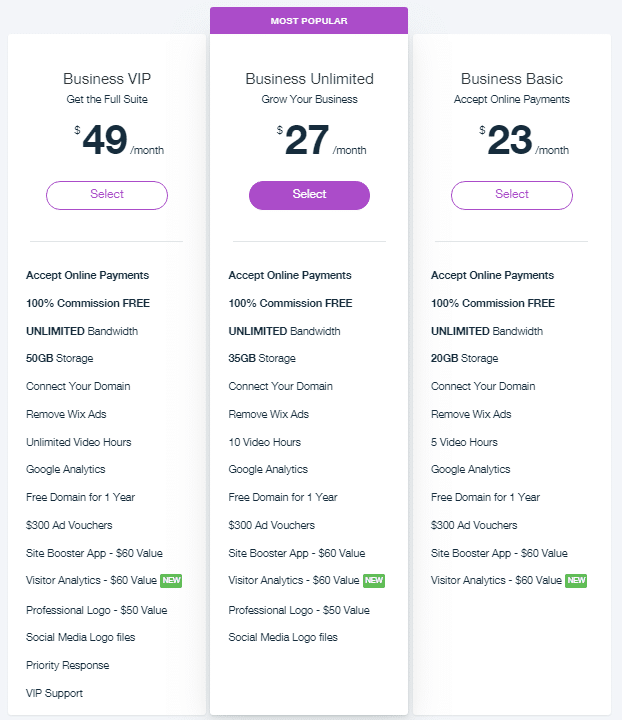
Wix pricing only makes sense if you separate “website” vs “selling.” Light is mainly for building a site. Core is where ecommerce really starts because that’s the first tier Wix positions for accepting payments and basic ecommerce tools.
These are the typical starting prices you’ll see advertised (USD, billed annually).
Prices can vary by location and promos, but this is the usual baseline.
| Plan | Typical price (USD, billed annually) | Can you sell online? | Best for |
|---|---|---|---|
| Light | $17/mo | No | A site without ecommerce |
| Core | $29/mo | Yes | First real online store |
| Business | $39/mo | Yes | Growing store that needs more |
| Business Elite | $159/mo | Yes | Higher scale and bigger teams |
What I would choose (simple rule)
If you want to sell products, skip Light. Start at Core so you’re not redoing the plan decision later.
- Light: content site, portfolio, “not selling yet”
- Core: first store build, simple catalog, basic ecommerce
- Business: when your store is real and you want more room to grow
- Business Elite: only if you’re scaling hard or need team-level features
Real cost checklist (what hits your wallet later)
Your plan is only one line item. Ecommerce cost usually becomes “plan + operations + growth tools.”
- Domain renewal later (many plans include a free domain for the first year)
- Business email if you want branded email
- Apps you add for reviews, popups, upsells, shipping upgrades
- Payment processing fees (separate from your Wix plan)
My practical take: pick the plan based on what you’re doing today. Upgrade only when your store needs it, not because the dashboard nudges you.
Selling Online With Wix
Ecommerce lives in workflows, not feature lists. You want products, shipping, promos, and checkout to work cleanly.
Products and catalog structure
A store is a catalog system. You’re building products, options, variants, and collections that support browsing and buying.
Apparel makes this more real. Baby clothing grows into size and color variants fast, so the workflow matters.
My recommendation is to build your hardest product first. If the “hard product” feels clunky, scaling your catalog will feel worse later.
Shipping and delivery
Shipping protects margin and trust. Wrong shipping rules either lose you money or lose you conversions.
I added an Express option for US shipping. The setup felt straightforward for a small store.
This is where scale starts to matter. If you need zones, weights, or complex rules, compare Wix vs Shopify early.
Discounts and promotions
Discounts are conversion mechanics. They exist to increase cart value and create a reason to buy now.
I set an automatic 15% off $100+ discount. Wix displayed it globally across the store, which keeps the offer consistent.
This is an AOV strategy. It nudges buyers to add one more item to hit the threshold.
Payments and checkout
I did not connect Wix Payments in this run. I’m not going to claim live transaction testing.
I did test the decision-making angle. I looked at the payments reporting area and asked support how to use it for “boost sales” insights.
That’s the real question. Analytics only matter if they change what you do next.
AI Tools
Wix AI is built to kill blank-page time.
Instead of starting with a template rabbit hole, Wix asks you questions and spins up a first draft so you can move straight into building.
The biggest value is momentum.
Wix wants you publishing a “good enough” store draft fast, then improving it, instead of stalling in setup loops.
What Wix AI actually offers
AI site creation through a chat-style build.
You describe what you’re making, and Wix generates a site brief and a starting site structure based on your answers.
AI refinements after the first draft.
You can regenerate or adjust key parts like:
- Site theme direction (fonts and colors)
- Layout variations (page structure changes)
- On-page text (rewrite or refresh site descriptions)
AI content tools for scaling pages. Wix also leans into AI to help you write and keep tone consistent as you build more pages.
AI section building. You can add common sections quickly (like forms, about sections, maps) without manually designing them from scratch.
AI image generation. Wix includes AI tools to generate visuals so you’re not stuck with empty image blocks while you build.
What I liked from using Wix AI onboarding
The questions are detailed in a good way.
It felt like Wix was trying to reduce decision fatigue by turning “I don’t know what to do next” into a guided path.
It’s a fast way to get a usable draft.
You can go from nothing to a store-shaped site quickly, then start making real ecommerce decisions like collections, shipping, and promos.
What AI still won’t do for you
AI won’t magically make you convert. You still need to tighten the offer, the product story, and the trust signals that remove checkout anxiety.
AI won’t replace real brand assets. Photos, product angles, and a consistent look still come from you.
My simple way to use Wix AI without looking generic
Use AI for speed, then switch to “human polish.”
- Keep the AI layout if the navigation and collection browsing are clean
- Rewrite product descriptions so they sound like your brand, not a template
- Add trust blocks that AI never nails perfectly (shipping, returns, contact, reviews)
- Check mobile layout early so the store doesn’t feel “desktop-built”
My takeaway: Wix AI is a legit launch accelerator. Just don’t treat the first draft like the final store.
Templates
Templates are one of Wix’s biggest strengths. Wix stores can look “finished” fast, and that matters because design is a trust signal in ecommerce.
Wix also gives you real visual control. You can adjust sections, spacing, and layout without code, which is why design-first brands like Wix.
The tradeoff is template switching later. Wix is more “pick your foundation and build on it” than “swap themes whenever.” So your first template choice matters.
What to look for in a Wix ecommerce template
Start with navigation first. Your header should support clear product categories, not just a pretty menu.
Check the shop and collection layout. If browsing feels awkward, conversions and SEO both suffer.
Look at the product page structure. You want room for the stuff that actually sells:
- Shipping and delivery clarity
- Returns in plain language
- Reviews or trust signals
- FAQs or sizing help (if you sell apparel)
Test one collection early. If the collection page feels clunky to browse, switch templates before you build 20 products.
My Wix template checklist (fast scan)
- Header supports collections (not hidden menus)
- Collection pages are browse-friendly (clear grid, filtering/sorting if needed)
- Product page has space for trust (shipping, returns, reviews, FAQs)
- Mobile layout looks clean (even if you build on desktop, buyers shop on phones)
- You can scale the layout (adding products doesn’t break the design)
Why templates matter for ecommerce
Templates control product discovery. If categories are obvious, people browse longer.
Templates control navigation clarity. If menus match collections, shoppers don’t get lost.
Templates control checkout confidence. If the store feels real, people stop hesitating.
| Testing template note: One nice thing about Wix and their AI feature is its going to take away the need to select and its going to base your look off of the questions you tell it as you build your site. So for instance, you don’t have to select that theme it will for you.
|
App Market
The Wix App Market is where you add features your store doesn’t have yet. Think popups, reviews, upsells, shipping upgrades, and customer messaging.
Most stores don’t need a bunch of apps at the start. For a new Wix store, you can usually launch with 0 to 3 apps if your offer and store structure are clean.
What apps Wix store owners usually add
- Reviews and social proof (trust on product pages)
- Email capture and popups (grow a list, promote an offer)
- Upsells and bundles (raise average order value)
- Advanced shipping tools (only if your rules get complex)
- Chat and messaging (reduce pre-buy hesitation)
- Bookings (if you sell services plus products)
The real tradeoff: app bloat
Apps can make Wix feel powerful fast. They can also create three predictable problems:
- Cost creep (monthly fees add up)
- Complexity (more settings, more places things can break)
- Performance weight (extra scripts can slow pages)
The Wix trap is “all-in-one plus 8 apps.” That’s when the store gets expensive, harder to manage, and sometimes slower than it needs to be.
My rule for choosing Wix apps
Add an app only if it does one of these:
- Saves time every week
- Reduces mistakes (shipping, orders, support issues)
- Increases revenue (AOV, leads, conversion rate)
If you can’t explain the problem it solves in one sentence, don’t install it.
Wix apps vs Shopify apps (quick reality check)
Wix has a solid app market for common needs. Shopify usually wins if you need deeper ecommerce-specific apps and long-term automation at scale.
SEO Feature Wix Has
Wix gives you a real SEO system, not just a couple fields to fill out. The difference is workflow. Instead of duct-taping plugins together, Wix builds SEO into the platform so you can control the fundamentals that actually impact ecommerce rankings: how pages get crawled, what gets indexed, how duplicates are handled, and how product data is understood by search engines.
What Wix gives you for ecommerce SEO
1) SEO Setup Checklist (good for avoiding “I forgot the basics”)
Wix guides you through a personalized checklist so you’re not guessing what to fix first. It’s not a shortcut to rankings, but it does reduce beginner mistakes like missing titles, broken indexing settings, or unverified Search Console.
2) On-page controls that are actually usable at scale
You can edit page titles, meta descriptions, and URL slugs, but the real value is being able to apply patterns across page types. That matters once you’re past 20 products and you don’t want to hand-write SEO settings for every single item.
3) Indexing and crawl control (the “keep thin pages out” lever)
Ecommerce sites create junk fast: internal search pages, filtered URLs, duplicate paths, and thin pages that never should have been indexed. Wix gives you tools to manage what should be visible to Google and what should stay out, which helps you protect quality signals.
4) Canonicals and duplicate handling (important for filters and similar collections)
When multiple URLs can lead to basically the same products, canonicals tell search engines what the “main” version is. That’s a quiet but critical ecommerce SEO feature because it prevents splitting authority across near-duplicate pages.
5) Structured data support (how Google understands your products)
Wix supports structured data on key page types like products. That helps search engines interpret your store as entities, not just pages, and can improve how your listings show up in search when your product info is clean and consistent.
6) Redirects that protect rankings when you make changes
You can set up redirects if you rename URLs, retire products, or reorganize collections. This is one of those “boring until it hurts” features. Without redirects, you bleed link equity and create dead ends for both users and Google.
7) Technical SEO foundation baked in
Wix handles a lot of the underlying technical work that supports SEO, like sitemaps and performance optimizations. You still need good content and intent matching, but the platform isn’t forcing you to engineer the basics from scratch.

I felt a very simple sitemap set up and easy guidance to view and make sure everything looked good.
My Wix SEO takeaway for ecommerce
Wix gives you the tools. The leverage comes from structure.
If you want Wix to rank, don’t run one generic “Shop” page and call it a day. Build focused collections that match real search intent, then connect the dots:
- collections as your category targets
- products as the detail pages
- supporting content that answers “how to choose” and “what’s best for” questions
- clean indexing so only your strongest pages compete
That’s how Wix SEO turns from “settings” into a system that can actually grow traffic.
| Wix SEO testing note: Wix gives you the core SEO tools you actually need, so you’re not stuck hunting for plugins just to handle basics. But SEO is still a “you and your strategy” game. Wix can’t magically rank your collections or products, it just gives you the controls to structure pages, target intent, and optimize properly if you do the work.
|
Marketing
Marketing features exist because traffic isn’t automatic. The job is turning casual visitors into buyers, then turning first-time buyers into repeat customers.
Wix leans into “built-in growth tools.” Instead of forcing you to stitch together five services, Wix pushes a marketing suite inside the dashboard that covers promos, email, ads, content, social, and basic customer management.
What I tested in Wix
I tested a real AOV promotion. I set an automatic 15% off when the cart hits $100+.
What I liked is how Wix surfaces it. Wix displayed that discount globally across the store, so the offer felt consistent instead of hidden on one page.
Why that matters: this is an Average Order Value strategy. You’re nudging the shopper to add one more item to hit the threshold, without needing a coupon code.
What Wix includes for ecommerce marketing
Wix is built around “launch and promote” from one place. Here are the marketing areas Wix emphasizes for ecommerce stores:
- Email marketing + automated emails (including abandoned cart style follow-ups)
- Ad campaigns you can launch from the dashboard (commonly positioned around Facebook and Instagram)
- Blogging to drive search traffic and support product discovery
- Social tools for creating posts and campaign content
- CRM-style tools like live chat, coupons, pop-ups, and automations
- Analytics to track what’s working and what isn’t
The strategic benefit is speed. Wix tries to keep you moving from store setup into promotion without needing a complicated external stack right away.
The “Wix marketing loop” I recommend for new stores
Keep it simple until you have traffic. A messy marketing stack kills focus and usually hurts performance.
Start with this 3-part loop:
- One AOV offer
- Example: 15% off $100+ (what I tested)
- Goal: raise cart size without adding friction
- One email capture offer (only if you’re building a list)
- Goal: turn visitors into subscribers
- Keep the offer simple and consistent
- One recovery follow-up once traffic is real
- Goal: bring back cart abandoners and product browsers
- Don’t over-automate before you have data
This loop works because it matches buyer psychology. Incentive to add more, a reason to stay connected, and a second chance to convert.
Where Wix is strong vs where Shopify usually wins
Wix is strongest for simple, fast marketing execution. Promos, basic email, basic ads, and on-site conversion tools are easy to start with.
Quick “what to use when” table
| Goal | Wix tool category to lean on | What it supports |
|---|---|---|
| Raise cart size | Discounts / coupons | AOV growth without codes |
| Capture leads | Pop-ups + email capture | List building for repeat visits |
| Recover missed sales | Automated emails | Cart recovery and retargeting |
| Drive new traffic | Ads + social tools | Top-of-funnel traffic |
| Build long-term traffic | Blog + SEO support | Evergreen discovery via search |
| Improve decisions | Analytics | What pages/offers convert |
My practical takeaway: Wix marketing is built to help beginners promote sooner. If you stay lean and focus on one offer at a time, it can work really well.
Security
Security is a conversion trigger. Buyers don’t think in technical acronyms. They think: “Does this checkout feel safe?” Wix is built as a hosted platform, so a big part of the security foundation is handled for you behind the scenes.
What Wix handles in the background
Wix positions security as “built-in.” That typically includes platform monitoring, protection against common threats, and infrastructure-level security that you don’t have to set up manually like you would with self-hosted stacks.
Wix also highlights compliance and encryption. The key takeaway for store owners is simple: you’re not duct-taping SSL, encryption, and baseline platform protections together yourself.
What you still control (and what affects trust the most)
Platform security isn’t the whole story. Your store still needs visible trust signals so buyers don’t hesitate at checkout.
Here are easy trust layers to add (fast wins):
- Shipping policy link in the footer
- Returns policy link in the footer
- Contact page easy to find (header or footer)
- Shipping promise near the Add to Cart button (cost, timing, and where you ship)
Account and access security (easy mistakes to avoid)
Store access is part of security too. If you have collaborators, limit permissions so not everyone has full admin access. Turn on 2-step verification if it’s available and keep logins tight.
Quick “who handles what” table
| Security layer | Wix handles | You handle |
|---|---|---|
| Platform protection | Hosting-level protections and monitoring | Store policies and buyer clarity |
| Encryption baseline | SSL/HTTPS foundation | Avoid risky embeds and sloppy plugins |
| Compliance foundation | Platform compliance posture | How you run your store and handle data |
| Access controls | Roles/permissions tools | Turning them on and limiting access |
| Buyer trust | — | Policies, contact paths, shipping clarity |
My practical take
Wix removes a lot of security setup work. That’s a real advantage for beginners who don’t want to stitch together hosting and security tools.
Your job is making the store feel safe. The fastest way is clear policies, clear shipping expectations, and an obvious way to contact you, because that’s what shoppers look for right before they buy.
Help and Support
Support speed matters in ecommerce. When checkout or reporting is confusing, you want answers fast.
Wix chat support responded in about 5 minutes. That’s a strong sign for beginners.
My question was about reporting. I asked about the payments analytics section and whether it could be configured to better support sales decisions.
| Support testing note: I was genuinely impressed with Wix support this time around. In past years, support felt like a weak spot, and it could be hard to get real help without hitting a wall of self-serve articles first. This time, chat support responded fast and focused on solving my question right away instead of funneling me into automated help links.
|
Wix vs Competitors
This is where the decision usually lands. Most readers are choosing between Wix and Shopify.
Wix vs Shopify
Wix wins when:
- You want guided setup and strong visual control
- Your store is simple and you want to launch fast
- You want an all-in-one website builder feel
Shopify wins when:
- You want ecommerce-first workflows
- You plan to scale operations and catalog complexity
- You want the deepest commerce ecosystem long-term
Compare them side-by-side here:
Summary
Wix is a strong choice for launching a small store fast. It’s beginner-friendly, design-flexible, and the onboarding makes building feel doable.
Shopify is usually the safer long-term ecommerce foundation. If you expect scaling and deeper operations, Shopify’s ecosystem is built for that.
Next step: compare Wix against the other platforms I tested.
Frequently Asked Questions
Is Wix good for ecommerce?
Yes, for small and medium stores. Wix works well if you want a fast setup, a visual editor, and a store that looks polished without code.
If you plan to scale hard, Shopify is usually better. Shopify tends to feel more commerce-first once operations get deeper.
What Wix plan do I need to sell online?
Choose the plan tier that supports ecommerce and payments. Don’t pick Wix based on the cheapest “starting at” plan if your goal is to accept payments.
My rule: start with the plan that unlocks selling features, then upgrade only if you hit a real limit.
Does Wix charge transaction fees?
You’ll always pay payment processing fees. That’s separate from your Wix plan.
The key is separating two layers: platform plan cost vs payment processing cost.
Can Wix handle a lot of products?
Wix can support large catalogs, but structure matters more than product count. Apparel stores feel complexity first through options and variants.
My advice: build your hardest product early (sizes + colors) before you load a big catalog.
How many variants can you have on Wix?
Wix has limits around options, choices, and variants. Many stores never hit them, but apparel brands can.
Smart test: create one product with multiple sizes and colors to see if the workflow fits your store.
Is Wix good for selling clothes?
Yes, for smaller apparel catalogs. Wix is beginner-friendly and gives strong design control.
If you expect lots of variants or fast growth, compare Wix to Shopify early. Shopify is usually more comfortable as complexity increases.
Can you switch Wix templates later?
Not easily. Wix is more of a “pick your foundation and build on it” platform.
Best practice: choose a template that already fits your store layout needs (home, collections, product pages) before you invest a lot of time.
Is Wix SEO good enough for ecommerce?
It can be, if your structure matches search intent. Collections and product pages usually matter more than SEO toggles.
Quick SEO win: build collections around real searches like “baby onesies” or “newborn outfits,” then link products and related content into those collections.
Does Wix have marketing tools built in?
Yes, and they fit simple store marketing well. Discounts and basic promotions are easy to run.
What I tested: an automatic 15% off $100+ promo, and Wix displayed it globally across the store.
Can you create automatic discounts in Wix?
Yes. Automatic discounts reduce friction because customers don’t need a code.
Best use case: AOV promos like “15% off $100+” to encourage bigger carts.
Can Wix do advanced shipping?
Wix handles basic shipping rules well. I added a US Express option without much friction.
If you need complex shipping logic, compare Wix to Shopify. Zones, weights, multiple carriers, and multi-location setups are where Shopify often wins.
Is Wix secure for online payments?
Wix is a hosted platform, so security is part of the value. The baseline security layer is handled for you.
Conversion tip: add trust signals like shipping and returns policies, because “feels safe” matters as much as “is safe.”
How is Wix customer support?
My experience was strong. Wix chat responded in about 5 minutes when I asked about reporting and payments analytics.
Why it matters: ecommerce issues are time-sensitive, so fast support helps you keep momentum.
Wix vs Shopify: which is better?
It depends on your goal.
Pick Wix if: you want design control and fast setup for a simpler store.
Pick Shopify if: you want an ecommerce-first platform built to scale with deeper apps and operations.
What’s the best alternative to Wix for ecommerce?
Shopify is the most common “step up” if you want to scale. If you’re still comparing, use my ranked list so you don’t bounce around random reviews:


Hey Sandy,
Oh For sure, I couldn’t believe how easy it was for me to set an account up. And with the features, you can’t argue with that either.
Do you currently use them?
Thanks,
Christopher Pontine
wix is always good.